Zone Trigger in the OscilloscopeThis Allows Complex Signal Anomalies to Be Graphically Isolated
A guest article by
Joel Woodward* | Translated by AI
6 min Reading Time
Complex signal anomalies are often difficult or impossible to detect with conventional hardware triggers. With graphical zone triggers, errors can be isolated by simply marking them on the oscilloscope display. A guide for the time and frequency domain.
Zone trigger: When conventional edge or pattern triggers reach their limits, the time has come for the zone trigger. By simply drawing zones on the oscilloscope display, rare anomalies can be isolated with pinpoint accuracy.
(Picture: Rohde & Schwarz)
The oscilloscope is the measuring instrument for troubleshooting and problem detection in electronic and electrical systems. A central element is the trigger function for isolating certain events. Oscilloscopes usually have several trigger types for investigating different events such as edges, pulse widths, patterns and other parametric conditions.
These hardware-based triggers are suitable for isolating rare events, but sometimes reach their limits. For example, a user may see an anomaly graphically, but not be able to easily isolate the event with the available trigger options. A graphical trigger, also known as a zone trigger, supplements conventional hardware-based triggering and provides a remedy here. It brings more flexibility to the analysis of signals. As this function is implemented in different ways depending on the manufacturer, it is important to consider exactly which requirements are to be met before purchasing an oscilloscope with a zone trigger function.
What is A Zone Trigger?
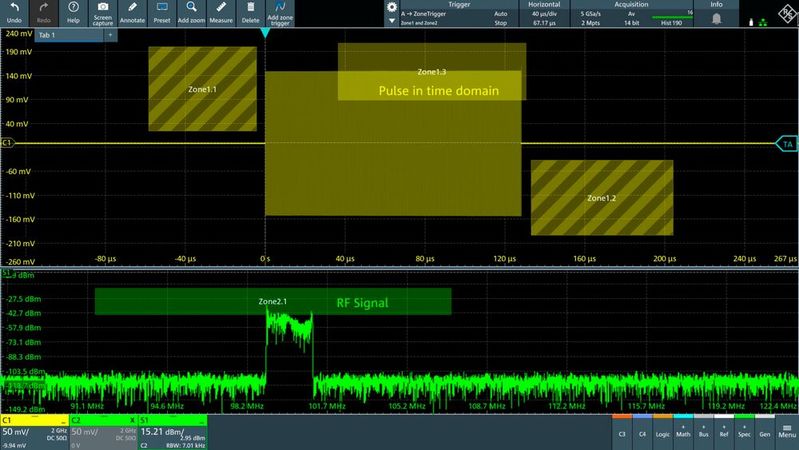
Figure 1: Zone triggering complements the oscilloscope trigger functions by allowing the user to graphically define one or more zones to be cut or not cut from the signal. The oscilloscope only displays the recordings that match the zone conditions and discards the remaining recordings. In the example, an RF chirp pulse was isolated by zone triggering.
(Picture: Rohde & Schwarz)
If you understand how a zone trigger works, you can better judge in which cases its use makes sense. With zone triggering, the user draws one or more zones on the oscilloscope screen. Each of these marked zones (Fig. 1) can be assigned the condition "Cut" or "Do not cut". The oscilloscope then checks with each acquisition whether a recorded signal waveform enters these zones or not. If the signal fulfills the zone conditions defined by the user, it is shown on the display. If this is not the case, the acquisition is rejected by the device. As a result, only those signal sequences are displayed that correspond exactly to the specified conditions.
A zone trigger is usually used as a second trigger stage after a conventional hardware-based trigger condition. This is similar to an edge trigger. This allows users to first isolate certain event types and then refine the analysis with a zone trigger.
Typical Applications for Zone Triggers
With the help of a zone trigger, users can graphically define conditions to isolate a specific event in the recorded signal curve. In practice, this is often more intuitive than thinking about how such signal events could be detected with a conventional hardware-based trigger condition. However, zone triggers were mainly developed to isolate events for which classic trigger types are simply unsuitable. A typical use case is, for example, the definition of a zone in order to find a specific pattern of ones and zeros in successive clock periods of a signal. A zone trigger can also be applied to mathematically calculated signal curves. This can be the product of current and voltage, for example, in order to trigger a specific power level in watts.
Zone Trigger for Mathematically Calculated Signals
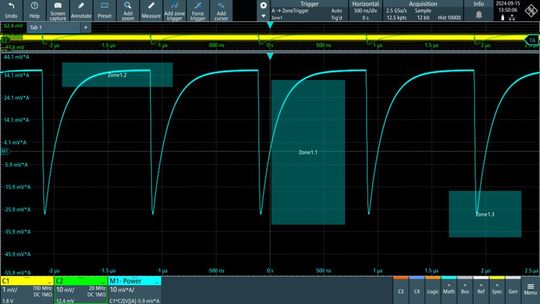
Figure 2: Zone triggering on mathematically processed measurement signals offers a flexibility that cannot be achieved with conventional oscilloscope triggers. You can trigger on the power in watts, the energy in joules, the total current, the total charge in coulombs or any signal that can be mathematically defined.
(Image: Rohde & Schwarz)
The conventional triggering of an oscilloscope takes place directly during signal acquisition on the analog or digital channels, i.e. on the physically present signals. However, as zone triggering is only carried out after the actual acquisition, there are virtually no limits to the possible applications. It is even possible to use mathematically processed signals (math channels) as trigger sources. Figure 2 shows several zones that have been defined on the basis of such a mathematical link. This opens up completely new possibilities for isolating events:
For example, if a user uses a current clamp and a voltage probe, the power can be displayed directly by multiplying the two signals. Zones can now be used to trigger specific power levels or anomalies in the power curve. If the user also applies an integral function to this power signal, a specific energy value in joules can even be used as a trigger condition. The new possibility of using mathematically processed signals as a source for zone triggering brings enormous flexibility to the isolation of complex events.
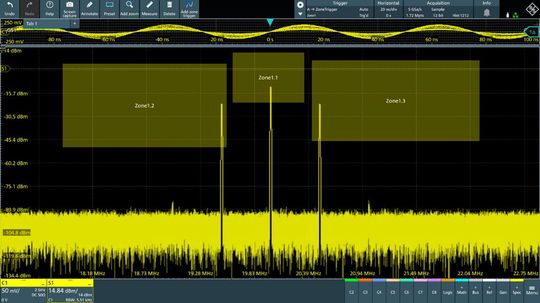
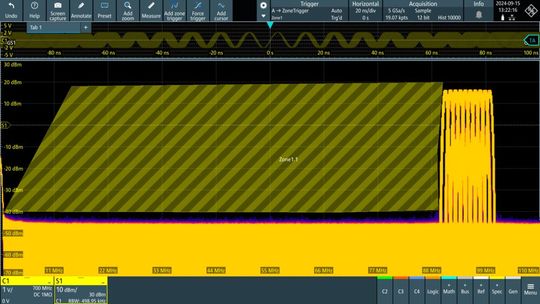
Figure 3: In this example, the user has set a zone trigger in the frequency range with the MXO 4 oscilloscope from Rohde & Schwarz. The oscilloscope triggers the acquisition and displays the recordings when the levels of the carrier and sidebands correspond to the defined zone ranges.
(Picture: Rohde & Schwarz)
In the past, oscilloscopes could only trigger on events in the time domain. Even devices with an FFT function, where the transformation into the frequency domain only takes place after the actual acquisition, did not offer the option of triggering in the spectrum. Figure 3 shows how users can now even use a zone trigger to isolate events of a signal specifically in its frequency range. By drawing in corresponding zones, it is possible to graphically determine at which frequencies and levels the oscilloscope should trigger.
Date: 08.12.2025
Naturally, we always handle your personal data responsibly. Any personal data we receive from you is processed in accordance with applicable data protection legislation. For detailed information please see our privacy policy.
Consent to the use of data for promotional purposes
I hereby consent to Vogel Communications Group GmbH & Co. KG, Max-Planck-Str. 7-9, 97082 Würzburg including any affiliated companies according to §§ 15 et seq. AktG (hereafter: Vogel Communications Group) using my e-mail address to send editorial newsletters. A list of all affiliated companies can be found here
Newsletter content may include all products and services of any companies mentioned above, including for example specialist journals and books, events and fairs as well as event-related products and services, print and digital media offers and services such as additional (editorial) newsletters, raffles, lead campaigns, market research both online and offline, specialist webportals and e-learning offers. In case my personal telephone number has also been collected, it may be used for offers of aforementioned products, for services of the companies mentioned above, and market research purposes.
Additionally, my consent also includes the processing of my email address and telephone number for data matching for marketing purposes with select advertising partners such as LinkedIn, Google, and Meta. For this, Vogel Communications Group may transmit said data in hashed form to the advertising partners who then use said data to determine whether I am also a member of the mentioned advertising partner portals. Vogel Communications Group uses this feature for the purposes of re-targeting (up-selling, cross-selling, and customer loyalty), generating so-called look-alike audiences for acquisition of new customers, and as basis for exclusion for on-going advertising campaigns. Further information can be found in section “data matching for marketing purposes”.
In case I access protected data on Internet portals of Vogel Communications Group including any affiliated companies according to §§ 15 et seq. AktG, I need to provide further data in order to register for the access to such content. In return for this free access to editorial content, my data may be used in accordance with this consent for the purposes stated here. This does not apply to data matching for marketing purposes.
Right of revocation
I understand that I can revoke my consent at will. My revocation does not change the lawfulness of data processing that was conducted based on my consent leading up to my revocation. One option to declare my revocation is to use the contact form found at https://contact.vogel.de. In case I no longer wish to receive certain newsletters, I have subscribed to, I can also click on the unsubscribe link included at the end of a newsletter. Further information regarding my right of revocation and the implementation of it as well as the consequences of my revocation can be found in the data protection declaration, section editorial newsletter.
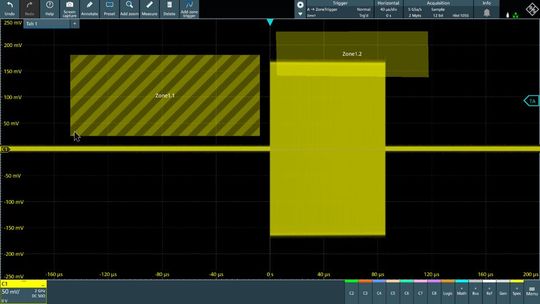
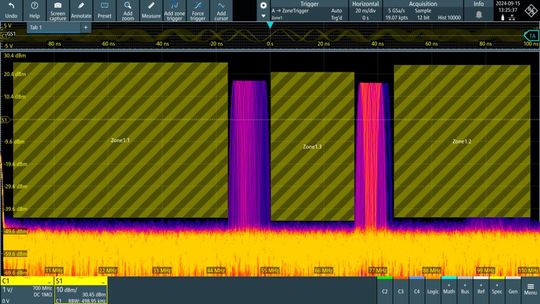
Figure 4a: In this example on an MXO 4 oscilloscope, the user configures various filters in the frequency range in three seconds using the zone trigger. The image shows how the zone generates a high-pass signal.
(Image: Rohde & Schwarz)
Fig. 4b: Here, the filter generates a combination of three zone areas that form a bandpass filter. This lets two bands through.
(Picture: Rohde & Schwarz)
With a zone trigger in the frequency range, you can quickly create user-defined filters that only allow certain frequency components to be recorded. A (blocking) zone on the left-hand side, i.e. at low frequencies, can take on the function of a high-pass filter, for example. If, on the other hand, the zone is located exclusively on the right-hand side, the result is the effect of a low-pass filter. A bandpass filter can be defined by combining several zones (Fig. 4).
Faster And More Reliable Detection With ASIC-Based Zone Triggers
As is so often the case in technology, a conventional zone trigger does not only have advantages, as it is traditionally a pure software post-processing process. This has two undesirable consequences: Firstly, the high computational effort considerably reduces the update rate (waveform update rate) of the oscilloscope. This can easily drop by a factor of 1,000 when a software zone trigger is activated. On the other hand—and this is even more critical for measurement technology—the dead time between the individual signal acquisitions increases drastically. In practice, purely software-based zone triggering can therefore usually only be used effectively for strictly periodic, repetitive signals, as rare events could otherwise fall into the long blind time.
However, a few current oscilloscope models have a hardware or ASIC-based zone trigger. This applies, for example, to the oscilloscopes of the MXO3, MXO 4, MXO 5 and MXO 5C series from Rohde & Schwarz. Its zone trigger can process up to 600,000 signal acquisitions per second and is therefore many times faster than a purely software-based approach. The ASIC-based zone trigger offers an extremely short trigger reactivation time of only around 1 µs. This value is outstanding even compared to the reactivation times of classic hardware triggers of most oscilloscopes on the market.
Selection Criteria for Zone Triggers
Anyone thinking about upgrading an existing oscilloscope or purchasing a new one with zone trigger should consider the following criteria: First of all, the device must of course support this function in principle. However, a closer look at the implementation is then crucial. The differences can be seen above all in the speed: an ASIC-based trigger is considerably faster and more reliable (shorter blind time) than a pure software trigger.
It is also important which signal sources are supported for the trigger function. Although every zone trigger can generally use an analog channel as a source, devices that also allow mathematically calculated signals and the signal spectrum (FFT) are much more flexible. A zone trigger in the spectrum display in particular opens up far-reaching analysis options that classic triggers in the time domain simply cannot offer.
Zone triggers also differ in many practical details. For example, some models only support rectangular zones, while others allow free shapes (polygons). Here, the respective application decides what is most suitable. Ease of use also plays a major role in everyday laboratory work: how intuitively can the size, shape, source and logic (cut/no cut) of the trigger zone be adjusted? The best way to test the devices on the shortlist is to see for yourself how smoothly zones can be added and removed using the touchscreen. In practice, this happens more often than originally expected. A final, equally important criterion is the maximum number of zones that can be defined simultaneously on the oscilloscope for a measurement task.
When Conventional Triggers Reach Their Limits
The zone trigger is a useful function that complements classic oscilloscope triggering and is becoming increasingly popular in practice. It is used precisely where conventional trigger types reach their limits. The most important technological advances in this area include the enormous increase in processing speed thanks to ASIC-based hardware triggers and the flexibility to apply zone conditions not only in the time domain, but also to mathematically calculated signals and in the signal spectrum (FFT). (heh)
Joel Woodward is strategic product manager for oscilloscopes at Rohde & Schwarz. He has more than 35 years of experience in the measurement industry and holds a degree in Electrical and Computer Engineering from Brigham Young University and an MBA from Regis University. He has also completed courses at Harvard Business School and holds a patent for FPGA debugging.
Secure and Compliant Authentication in Laboratories



:quality(80)/p7i.vogel.de/wcms/17/b8/17b8af0cb725e0e1d3e8d72458bab260/siemens-meet-at-the-machinev1.jpeg "“Meet at the Machine” is Siemens’ new initiative, which aims to bring together machine builders, software, and automation technologies to accelerate innovation in the machine tool industry and help manufacturers become productive more quickly. (Source: Siemens)")
:quality(80)/p7i.vogel.de/wcms/8e/7e/8e7e0cda4c68699bcc48283a38739769/0133316747v1.jpeg "A little-known hidden champion! When people think of laser cutting, the first thing that comes to mind is the power of the laser beam—and it is impressive to see the sparks flying. But Air Liquide—an exhibitor at Euroblech, by the way—wants to make it clear that the process gas is also key to success. (Image:AI-generated)")
:quality(80)/p7i.vogel.de/wcms/20/fa/20fa35e0af203c3464f7e7fdbb57a685/0133281172v1.jpeg "Since 2003, Etzinger AG has been developing and manufacturing high-quality coffee grinders, pepper mills, and grinding mechanisms for professional and home use. (Image:Etzinger)")
:quality(80)/p7i.vogel.de/wcms/69/91/6991413943488b4a2f6fde9dcd88c5b0/0133256686v1.jpeg "The CMA-patented pendulum mount can compensate for radial tolerances of up to one millimeter. (Image:Schwiening)")
:quality(80)/p7i.vogel.de/wcms/38/79/38799bfbbccd938b64c67068cfa68780/0133329362v1.jpeg "What exactly enables machines to act on their own? (Image:Shutterstock)")
:quality(80)/p7i.vogel.de/wcms/1b/9f/1b9fc9f113fc66212e2c0e17a3edaf9f/org-blobs-user-response-file-output-f317796f-57b7-483f-9403-5d9ac8a816f5-plugin-output-call-kdigtepb7be7us8xvbota0mh-1672x940v1.png "According to Barclays data, Europe leads the global trade in actuator components. With a 34 percent share, the region ranks ahead of China, which has a 26.3 percent share. (Source: Statista | CC BY-ND 4.0, AI-generated)")
:quality(80)/p7i.vogel.de/wcms/f5/4c/f54c9fc59ccb0604ab9219188469a45f/image1v1.jpeg "Christopher Savoia, Global Head of the UR+ Ecosystem at Universal Robots, presents the new SP7 Smart Panel on a UR17g-1300 robot during the unveiling of Gen 7—UR’s 7th-generation robot platform—at IMTS in Chicago on September 14, 2026. (Image:Image: Teradyne Robotics)")
:quality(80)/p7i.vogel.de/wcms/bd/4e/bd4ef09ab0f84932ea76ca0330ffe789/0133329802v1.jpeg "The robotics boom and its consequences: According to a study, a significant portion of value creation occurs in the electronics industry. (Image:Fraunhofer IPA)")
:quality(80)/p7i.vogel.de/wcms/87/87/87870cf2b30aaef7b8a06212a4ef2c14/0133403885v1.jpeg "A digital twin and a real component demonstrate how closely simulation and manufacturing are converging. Stampack Xpress 2026.1 virtually models forming behavior and supports the validation of process and tool design. (Image:Stampack)")
:quality(80)/p7i.vogel.de/wcms/59/2a/592a7f2d0964e9e6846cae331f5daa3a/0133266065v1.jpeg "Perforated metal sheets are particularly well-suited for balcony railings, as they combine stability, privacy, and design versatility. (Image:Ripo Factory)")
:quality(80)/p7i.vogel.de/wcms/45/64/45642ff0fe0a6bec251b77739131d83b/abb-ferrari-hypersail-16-9-three-quarter-front-viewv1.jpeg "The Ferrari Hypersail is a 100-foot monohull wing-in-plane yacht powered entirely by renewable energy. (Source: ABB / Ferrari Hypersail)")
:quality(80)/p7i.vogel.de/wcms/3e/0e/3e0e3ea22e48410ceada53b02ffccb59/0133358454v1.jpeg "BYD top executive Stella Li plans to offer megawatt flash charging for commercial vehicles as well. (Image:VDA/IAA Transportation 2026)")
:quality(80)/p7i.vogel.de/wcms/e2/7d/e27de60472809cc58ac0d321066c9679/l1051833v1.jpeg "Geely has acquired a stake of just over 26 percent in Renault do Brasil. Geely models for the South American market are now also being produced at the Ayrton Senna plant in São José dos Pinhais. (Image:Renault)")
:quality(80)/p7i.vogel.de/wcms/1e/c1/1ec1495eb283200f4b7cb55de0c4dff7/20260917-110436643v1.jpeg "Ceremonial launch of Mercedes-Benz GLA production in Rastatt; among those in attendance was plant manager Marco Zwick (second from the right). (Source: Thomas Günnel – Automotive Industry)")
:quality(80)/p7i.vogel.de/wcms/76/f3/76f310eed0caebc79ff91195c29de08d/visual-siwa-treatment-optimizerv1.jpeg "A Mireo train from Siemens Mobility was used in the “Automated Train” project for a fully automated delivery and return trip on the open rail network. (Source: Siemens Mobility)")
:quality(80)/p7i.vogel.de/wcms/4c/53/4c534208d09a9b1ce597938715e7fc19/0133288763v1.jpeg "Logic Folding: In its latest Kirin 9050 Pro, Huawei uses hybrid bonding to distribute the computing units across two silicon layers in order to increase the effective transistor density without resorting to finer manufacturing processes. (Image:Huawei)")
:quality(80)/p7i.vogel.de/wcms/56/d1/56d131e0b5bd05ef47411e92ad740cb4/0133351029v1.jpeg "Researchers at DTU have developed a nanolaser in a semiconductor membrane. The structure concentrates charge carriers and the light field into a small area (shaded in blue). If data is transmitted on microchips using light instead of electrical signals, transmission speeds can be increased and energy losses reduced. (Image:Yi Yu, DTU)")
:quality(80)/p7i.vogel.de/wcms/5e/55/5e55101ddc6338f755fcf3244db1367f/0133331863v1.jpeg "For data center projects, it is becoming increasingly important to also obtain the consent of the affected community. (Image:Dall-E / AI-generated)")
:quality(80)/p7i.vogel.de/wcms/8d/f9/8df95d3f58408673986b3d643e6b63ba/0133252773v1.jpeg "TXC targets high-speed optical links in AI data centers with 312.5 MHz oscillators, among other solutions. As data rates increase, requirements for jitter and frequency stability become more demanding as well. (Bild: TXC)")
:quality(80):fill(efefef,0)/p7i.vogel.de/wcms/67/ac/67acb931a438c/elatec-wp-gmp.png "Elatec WP GMP")
:quality(80)/p7i.vogel.de/wcms/34/e2/34e2a9e46e59eb28f09f9a5fdf41ff9a/0130091813v1.jpeg "Electrical drive trains require a multidimensional concept of performance characterization. Rohde & Schwarz has developed the MXO 3 oscilloscope series for this purpose. (Image:Rohde & Schwarz)")
:quality(80)/p7i.vogel.de/wcms/70/5e/705ee511d036d58a280fcd7b79aba0aa/0128164294v1.jpeg "PXI oscilloscopes PXIe-5108 are modular, software-defined measurement devices for use in everything from basic research to mass production. They are available with four and eight inputs. (Image:National Instruments)")