Raspberry Pi DebuggerRaspberry Pi Debug Probe, an all-in-one USB-to-Serial debugger
From
Margit Kuther | Translated by AI
7 min Reading Time
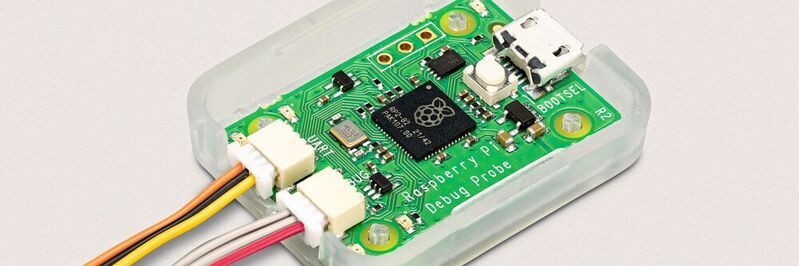
The Raspberry Pi Debug Probe is a debugging solution for ARM-based microcontrollers. The kit includes hardware and wiring to support "plug and play" debugging of devices like the Raspberry Pi Pico with host platforms such as PC, Mac, and Linux computers.
Raspberry Pi Debug Probe in an open case: featuring serial debug and UART interface.
(Picture: Raspberry Pi/Atlantik Elektronik Raspberry Pi/Atlantik Elektronik)
The Raspberry Pi Debug Probe provides both a serial debug interface for the processor (typically the ARM Serial Wire Debug interface by default) and a UART interface to industry standards. Eben Upton, Chief Executive of Raspberry Pi Trading, presents the Raspberry Pi Debug Probe as follows: "Since we launched the Raspberry Pi Pico and our RP2040 microcontroller in January 2021, people have been using a Pico to debug code running on another. Inspired by this trend, today we are releasing the Raspberry Pi Debug Probe, a complete hardware debugging solution for ARM-based microcontrollers, powered by the RP2040, and priced at just $12."
While the Raspberry Pi Debug Probe was specifically designed for the Raspberry Pi Pico and other RP2040-based targets, it still offers standard CMSIS-DAP debug interfaces (CMSIS-DAP is a simple low-level USB protocol for debug probes) as well as a UART interface via USB to industry standards. Both interfaces use a 3-pin debug connector, as specified in the Raspberry Pi 3-pin debug connector specification (see below). The Raspberry Pi Debug Probe can thus be used for debugging any ARM-based microcontrollers that provide an SWD port with 3V3 I/O. Additionally, the Raspberry Pi Debug Probe can be easily used as an inexpensive USB-to-UART cable.
The Raspberry Pi Debug Probe is based on the hardware design of the Raspberry Pi Pico and operates with the open-source software Raspberry Pi Picoprobe. Firmware updates are done in the same manner as a Raspberry Pi Pico, making it easy to keep the device up-to-date with the latest Picoprobe firmware or to use custom firmware.
Delivery of the Raspberry Pi Debug Probe
The Raspberry Pi Debug Probe is delivered as a kit, according to Atlantik Elektronik, containing the hardware in a plastic case and cables: a USB cable and three different types of debug cables to cover most use cases. The Raspberry Pi Debug Probe is priced at $12 (list price) and can be obtained directly from Raspberry Pi.
Debug Probe aids in troubleshooting
"Debugging is a necessary evil, and if you want to hunt bugs, sooner or later, you need a debugger," says Eben Upton. While most debuggers offer a set of basic functions (single-stepping, breakpoints, variable and memory inspection), these functions are provided in different ways depending on the language and operating environment. You might be using an interpreted high-level programming language like Python, where debug functions are integrated directly into the runtime environment. Or you could be using a low-level compiled programming language like C, but your program is running on an operating system like Linux; in this case, a debugger, often running on the same machine, can interact with your program as it runs to provide the same functions.
But what if your C program runs directly on the processor without an operating system (this is often referred to as bare-metal operation)? What if you are writing an operating system? In this case, you need a way to access the debug functions built into the processor itself. And this is precisely where the Debug Probe comes into play.
What is a Debug Probe?
All modern ARM-based microcontrollers, including the RP2040, implement the CoreSight Debug Architecture by ARM. Each processor core, such as the Cortex-M0+ used in the RP2040 microcontroller, provides an Access Port (AP) that can be used for single-stepping, setting breakpoints, observing the values of processor registers, and accessing memory and peripheral devices through the processor's bus interface. The microcontroller itself offers a Debug Port (DP) externally connected with pins on the package and internally connected to each AP in the system. The RP2040 provides its DP via a Low-Pin-Count Serial Wire Debug (SWD) port: Through the SWD protocol over this port, a host computer can control the AP of each core to debug a program running on the core. A debug probe acts as a bridge between USB and the SWD protocol. While not strictly necessary if the host computer is a Raspberry Pi (you can directly connect the target's SWD port to the GPIO header of a Raspberry Pi), it is much more convenient to establish a connection via USB. And if you are using a PC or Mac, USB is the only option.
The Raspberry Pi Debug Probe provides the SWD signals on a three-pin JST connector, adhering to the Raspberry Pi Debug Connector specification. Raspberry Pi offers adapter cables for solderless connection to a breadboard and to the debug port of the Raspberry Pi Pico H and WH models. Arm has standardized the protocol for communication over USB between a host computer and a debug probe. The Raspberry Pi Debug Probe complies with this CMSIS-DAP standard, making it instantly compatible with many existing debug software platforms, including our favorite, OpenOCD.
Date: 08.12.2025
Naturally, we always handle your personal data responsibly. Any personal data we receive from you is processed in accordance with applicable data protection legislation. For detailed information please see our privacy policy.
Consent to the use of data for promotional purposes
I hereby consent to Vogel Communications Group GmbH & Co. KG, Max-Planck-Str. 7-9, 97082 Würzburg including any affiliated companies according to §§ 15 et seq. AktG (hereafter: Vogel Communications Group) using my e-mail address to send editorial newsletters. A list of all affiliated companies can be found here
Newsletter content may include all products and services of any companies mentioned above, including for example specialist journals and books, events and fairs as well as event-related products and services, print and digital media offers and services such as additional (editorial) newsletters, raffles, lead campaigns, market research both online and offline, specialist webportals and e-learning offers. In case my personal telephone number has also been collected, it may be used for offers of aforementioned products, for services of the companies mentioned above, and market research purposes.
Additionally, my consent also includes the processing of my email address and telephone number for data matching for marketing purposes with select advertising partners such as LinkedIn, Google, and Meta. For this, Vogel Communications Group may transmit said data in hashed form to the advertising partners who then use said data to determine whether I am also a member of the mentioned advertising partner portals. Vogel Communications Group uses this feature for the purposes of re-targeting (up-selling, cross-selling, and customer loyalty), generating so-called look-alike audiences for acquisition of new customers, and as basis for exclusion for on-going advertising campaigns. Further information can be found in section “data matching for marketing purposes”.
In case I access protected data on Internet portals of Vogel Communications Group including any affiliated companies according to §§ 15 et seq. AktG, I need to provide further data in order to register for the access to such content. In return for this free access to editorial content, my data may be used in accordance with this consent for the purposes stated here. This does not apply to data matching for marketing purposes.
Right of revocation
I understand that I can revoke my consent at will. My revocation does not change the lawfulness of data processing that was conducted based on my consent leading up to my revocation. One option to declare my revocation is to use the contact form found at https://contact.vogel.de. In case I no longer wish to receive certain newsletters, I have subscribed to, I can also click on the unsubscribe link included at the end of a newsletter. Further information regarding my right of revocation and the implementation of it as well as the consequences of my revocation can be found in the data protection declaration, section editorial newsletter.
Serial Communication
Eben Upton emphasizes, "We often want to establish a serial console connection between a microcontroller target and a host computer. This provides an easy way to interact with the software running on the target and retrieve logging and other diagnostic data. If the host computer is a Raspberry Pi, you can use one of the UART peripherals accessible via the GPIO header. However, if you're using a PC or Mac, it's very unlikely that you have access to a built-in serial interface." The Raspberry Pi Debug Probe functions as a serial USB adapter, sharing the same USB port as the SWD bridge. It provides the UART signals on a second three-pin JST connector, which, once again, adheres to the Raspberry Pi Debug Connector specification. For users who don't require debugging functionality, the Raspberry Pi Debug Probe is a cost-effective alternative to other serial USB adapters due to its low price. It has largely replaced the once ubiquitous FTDI cable as our preferred adapter here at Pi Towers.
Details about the developers of the Raspberry Pi Debug Probe
Eben Upton: "The Raspberry Pi Debug Probe project was led by James Adams, who developed the concept and designed the hardware. Jonathan Bell wrote the software, drawing inspiration from the DapperMime project. John Cowan-Hughes designed the plastic parts and the rather neat packaging mechanics. Jack Willis designed the packaging graphics. Rose Nott was in charge of the supply chain. Alasdair Allan and Andrew Scheller worked on the documentation."
Details on the specification of the 3-pin debug connector
The Raspberry Pi defaults to using a small, encoded 3-pin connector that can be used for UART or 2-wire serial debug interfaces. The oldest and most universal "debug" connector is a simple UART of the 16550 type. A UART requires two unidirectional pins, one for transmitting data from the target to the host (TX) and one for the other direction (RX). The 3-pin interface of the serial debug connector was designed to work with a single unidirectional clock pin and a bidirectional data I/O pin. This arrangement can support ARM's Serial Wire Debug (SWD) or something like cJTAG. Important: When referring to UART TX and RX, according to Raspberry Pi Trading (responsible for the manufacturing and distribution of the Raspberry Pi single-board computer), it is about the pins from the perspective of the target! If the target is, for example, a BCM2711 SoC, then RX means the signal going into the SoC, and TX means the signal coming out of the SoC.
Pin assignment
Each of the interfaces requires two pins and a ground, allowing for the use of a coded 3-pin connector for both:
Figure Pinout: Each of the interfaces requires two pins and a ground, allowing for the use of a coded 3-pin connector for both:
(Picture: Raspberry Pi Raspberry Pi)
Raspberry Pi Trading set the pin assignment in a way that the unidirectional SC (going into the debug target) is on the same pin as the UART RX signal, which also goes in the same direction. This avoids conflicts since Raspberry Pi Trading uses the same connector for both UART and serial debugging, preventing incorrect plugging.
Raspberry Pi Trading also specified that SD and UART TX share the same pin. The reason: Plugging a UART into a serial debug interface is 'safe,' and there won't be conflicts. If a serial debug interface is connected to a UART, there might be conflicts on the TX/SD pin, but the current is limited by the termination resistors. Raspberry Pi Trading also specified 'source termination' resistors on both pins at both ends of the connection:
100-ohm resistor on the SC/TX and SD/RX IC pins at the host.
100-ohm resistors on the SC/RX and SD/TX IC pins at the target.
Further details on the specification of the 3-pin debug connector can be found on the Raspberry Pi website. The article is based on documentation from Raspberry Pi and Atlantik Elektronik.



:quality(80)/p7i.vogel.de/wcms/d1/ef/d1ef6b6f7d4543f7999980bacccaf22b/0133499261v1.jpeg "As the growing imbalance in trade relations with China continues to widen, the EU Chamber of Commerce foresees a day when trade with China will have to be seriously reevaluated ... (Image: AI-generated)")
:quality(80)/p7i.vogel.de/wcms/fe/1f/fe1fa5ee713f94deaba963dc24c3abc5/0133299273v1.jpeg "The Flexistar enables highly flexible production of laser-welded tubes thanks to its tool-free clamping system. (Image:Because Technology, LLC)")
:quality(80)/p7i.vogel.de/wcms/1b/5a/1b5ac72f83db4dbee3ff91e51bc398f4/0133496095v1.jpeg "BASF announces that it will take the next step toward producing the polyurethane precursor MDI in India ... (Image:BASF)")
:quality(80)/p7i.vogel.de/wcms/3f/cf/3fcfa390902944ffcf24e7fe973cc3ee/0133486258v1.jpeg "Do you need to create secure connections on structures using blind rivets, but space is tight? Then you should take a closer look at the Universalgrip from Gesipa ... (Image: Gesipa)")
:quality(80)/p7i.vogel.de/wcms/60/ef/60ef4f07e4829b2c2929befc0f353c58/0133511729v1.jpeg "Humanoid robots can match human performance in certain tasks. (Image:Gemini / AI-generated)")
:quality(80)/p7i.vogel.de/wcms/2e/99/2e99726b522e4b35b690e25eb6a42643/0133463991v1.jpeg "Robotics: In AMR applications, connection technology must reliably transmit power, signals, and data despite vibration and shock loads—in very confined spaces and in a way that allows for regular maintenance. (Image:Hyperever)")
:quality(80)/p7i.vogel.de/wcms/d0/18/d01801e3d5dbd7bc9d0b4f60408b630c/0133468429v1.jpeg "Quality requirements for film packaging are on the rise. At the same time, many companies are turning to recyclable film materials, which, however, have their own challenges. Fraunhofer researchers have therefore developed a fast system that detects problems in real time. (Image:Fraunhofer IKTS)")
:quality(80)/p7i.vogel.de/wcms/b1/06/b106cf44923ce39565c3264982fd20eb/0133414574v1.jpeg "Robots Build Robots: At the new Ubtech factory, automated systems even handle parts of the material supply and logistics for the production of humanoid robots. (Image:Ubtech)")
:quality(80)/p7i.vogel.de/wcms/c0/52/c052f405eb55fc3d08c4837e77206fc0/adobestock-2021845957--aucartstudio-stock-adobe-com-ki-generiertv1.jpeg "An innovation from China to combat extreme summer heat: A novel coating lowers temperatures. (Source: © AucArtStudio – stock.adobe.com_AI-generated)")
:quality(80)/p7i.vogel.de/wcms/66/a7/66a7b78159caeacce57136529688799f/0133503398v1.jpeg "Sunlight Makes Stone! These stone blocks weren't made the traditional way. Instead, they were additively manufactured from sand using a laser. In the future, however, the laser is set to be replaced by concentrated sunlight—if the startup Addisol is successful... (Image:Addisol / F. Fiedler)")
:quality(80)/p7i.vogel.de/wcms/72/b9/72b995c2c8d812c5e2115cbef31e035a/0133462727v1.jpeg "Eggl manufactures center hoods that are precisely tailored to each cooking island—whether standard size or custom shape. They are made entirely of stainless steel and are individually customized in terms of size and filter arrangement. (Image:SPI)")
:quality(80)/p7i.vogel.de/wcms/13/5d/135dfae6229ceaf5c55467a43e8f7257/adobestock-1879961393--ardi-stock-adobe-com-ki-generiertv1.jpeg "Annoying chatterboxes or awkward silences in response to questions—a moderator should specifically prepare for difficult situations in order to navigate them effectively. (Image:ardi - stock.adobe.com_AI-generated)")
:quality(80)/p7i.vogel.de/wcms/aa/a2/aaa2c6dd2daa24b485cddbf9297590c0/0133467318v1.jpeg "Battery Monitoring: Battery monitoring using electrochemical impedance spectroscopy offers several advantages. (Image:TI)")
:quality(80)/p7i.vogel.de/wcms/39/b2/39b21bf03be1683831862239a369987c/0133469638v1.jpeg "Data from autonomous vehicles and robots operating autonomously is in high demand, and Ruqi wants to capitalize on this. (Image:Ruqi Mobility)")
:quality(80)/p7i.vogel.de/wcms/8a/bb/8abbb6217220595edc1549ac9b84f307/0133429906v1.jpeg "The IAA in Hanover showcased the ambitions of Chinese commercial vehicle manufacturers in Europe. (Image:Wehner - VCG)")
:quality(80)/p7i.vogel.de/wcms/0c/53/0c5313ef91c14b6df0d0996efc33c8ad/jpg03568-bearbeitetv1.jpeg "The category winners of the 2027 German Car of the Year award. (Source: GCOTY)")
:quality(80)/p7i.vogel.de/wcms/f3/d8/f3d870d8f31a5a5110449c929ea3e641/0133470449v1.jpeg "The new Nexora sensor family from Teledyne e2v: These CMOS image sensors combine BSI technology with a global shutter and are available in 12- and 16-megapixel versions. (Image:Teledyne)")
:quality(80)/p7i.vogel.de/wcms/11/2e/112eabc5fb41e1a401f0e93e9326ef51/0133489329v1.jpeg "A sandbox limits the actions an AI agent can take, but it is not an impenetrable barrier. Only multiple independent layers of protection prevent an escape from immediately granting access to production systems. (Image:freely licensed)")
:quality(80)/p7i.vogel.de/wcms/18/ba/18bae45f9e6f7cacc203d56f3bc26e3c/0133455937v1.jpeg "Google did not make the incidents public until after receiving an inquiry from the “Wall Street Journal.” (Image:Google)")
:quality(80)/p7i.vogel.de/wcms/65/58/655895abe42a598e146fe47baf7c54db/0133441212v1.jpeg "Wukong, a 72-qubit quantum processor manufactured by Origin Quantum. (Image:Origin Quantum)")

:quality(80)/p7i.vogel.de/wcms/1a/dd/1add8d33096e196d5d02a9dc270071d5/0132256041v1.jpeg "Two in one: Forgix is equipped with a microcontroller and an FPGA. (Image:Adiuvo Engineering)")
:quality(80)/p7i.vogel.de/wcms/2c/d3/2cd367ae84a9f69c651960b3b4d4287d/0127597143v1.jpeg "Shrike-lite: FPGA and a microcontroller for only four US dollars. (Image:Vicharak)")