ALM integrates people, processes and tools to enable end-to-end collaboration and transparency in product development. We present three new solutions here.
We present three innovations from the PLM and ALM world.
(Image: The Pixel Store stock.adobe.com AI-generated)
PTC releases Codebeamer 3.2, Codebeamer AI 1.0 and Pure Variants 7.2
PTC presents the latest versions of Codebeamer, Codebeamer AI, and Pure Variants, which are central components of the Application Lifecycle Management (ALM) portfolio. These updates are specifically designed to assist companies in addressing current challenges. These challenges notably include the increased pressure from regulatory requirements and the growing complexity of products that are increasingly software-driven.
The new features aim to provide companies with greater security and better control. They enhance traceability and change management, offering managed AI support that meets regulatory and quality requirements.
Key New Features of Codebeamer 3.2 and Pure Variants 7.2 at a Glance:
Digital thread integrations seamlessly connect Codebeamer with PTC's Windchill PLM solution and other enterprise systems. This enables teams to more easily track requirements, manage changes, and ensure compliance in software and hardware development.
Stream baselines provide complete snapshots of all projects within a stream. This ensures consistent baselines, makes relevant project phases easier to identify, and helps optimize change management within complex portfolios.
UI upgrades for the Review Hub enable bulk approvals and rejections, clearer notifications, and visual highlights of differences.
Feature-Based PLE automates the creation of streams and stream baselines. It also utilizes Delta Merge (Beta) to support parallel development across platforms and variants. This enables teams to deliver new features at both levels and optimize reuse across the entire product line.
With the new releases Codebeamer 3.2, Codebeamer AI 1.0, and Pure Variants 7.2, PTC presents the latest developments in its ALM portfolio.
(Source: PTC)
Based on these features, PTC introduces two new AI assistants with Codebeamer AI 1.0: The Requirements Assistant, aligned with the guidelines of INCOSE and ISTQB, automatically detects quality issues in requirements. This allows for clearer, standards-compliant requirements to be created more quickly and with less reliance on expert reviews.
Additionally, the manual creation of test cases is often time-consuming and error-prone. The Test Case Assistant generates and optimizes test cases directly from the requirements, enabling higher accuracy and consistency, improved traceability, and accelerated validation activities.
Intelligent Assistant “AI Optimizer” for Polarion Users Unlocks Automation Potential
According to BCT Technology AG, the AI Optimizer is a powerful extension for Polarion ALM, the Application Lifecycle Management system from Siemens Digital Industries Software. This solution has already been successfully implemented and is now being specifically introduced to a broader user base. The AI Optimizer acts as an intelligent assistant that uncovers automation potentials in requirements and test management, significantly facilitating the transition to AI-supported processes.
The intelligent assistant for the Polarion ALM system is designed to unlock automation potential in requirements and test management.
(Source: BCT Technology)
AI-Based Quality Analysis of Requirements: A central feature of the AI Optimizer is the automated quality assessment of requirements. The AI analyzes work items based on established best practice criteria such as clarity, understandability, verifiability, and completeness. Users receive immediate improvement suggestions for linguistic or structural optimization. This ensures that requirements are not only documented but also substantive and testable.
Generation of Test Cases via AI: The solution enables the complete generation of test cases from existing requirements, both from work items and live documents. The AI Optimizer creates structured tests, including descriptions, prerequisites, and test steps. This not only significantly accelerates the creation of test cases but also ensures better consistency in test coverage and saves valuable resources in quality assurance.
Intelligent Capture of User Requests: With an integrated chatbot module, content such as support requests, bug reports, or change requests can be submitted by external users through web interfaces. The AI Optimizer analyzes the input, assists the user by asking targeted follow-up questions for complete information sharing, and automatically converts it into structured Polarion work items. Additionally, PDF or image files can be analyzed using OCR technology, allowing relevant content to be directly incorporated—without manual copy and paste.
Quick Deployment Without Data Privacy Risks: The extension can be installed in just a few minutes and is ready for immediate use—without the need for additional infrastructure. The AI Optimizer can be utilized either through an OpenAI interface or seamlessly integrated into existing internal AI systems via Azure-GPT. When connected through Azure-GPT, the content remains entirely within the company's own system—an important advantage for security-sensitive or regulated industries.
The AI Optimizer is applicable across various industries, particularly in the fields of mechanical engineering, automotive, medical technology, and aerospace. Companies that are already using Polarion ALM can achieve significant efficiency gains through the targeted use of AI functions without fundamentally restructuring existing processes.
Up to 8x faster with one-third of the resource consumption: The current version of the open low-code platform Contact Elements aims to provide companies with a significant speed advantage in digital transformation. A central step is the departure from the Windows client and the complete transition to an optimized web architecture.
Contact Elements creates a seamless digital thread with over 50 flexibly combinable application components that support companies in efficient product development. The platform also paves the way for enterprise-level AI integration.
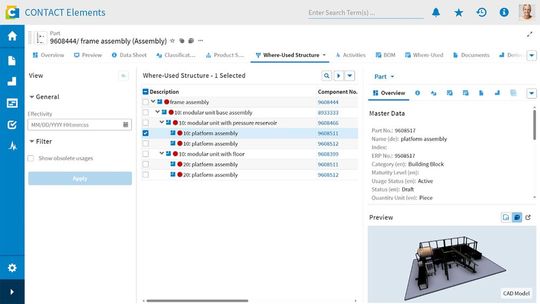
The usage structure displays all assemblies in which the component has been installed in a specific version.
(Source: Contact Software)
Enhanced PLM Functions for Complex Product Development:
The new release brings improvements for Product Lifecycle Management (PLM). The integrated alternative PDF viewer in CIM Database PLM enables redlining, annotations, and digital signatures directly in the application. This accelerates collaborative work as well as document sharing.
Variant management has been expanded to requirements structures, thereby supporting the efficient handling of product families and custom adaptations. A new usage structure creates transparency regarding the dependencies and usage locations of components and documents.
The new solution Catalyst for ALM (Application Lifecycle Management) integrates software repositories into CIM Database, for example with GitLab. This enables seamless tracking of hardware and software components throughout their entire lifecycle.
Enhanced Data Analysis and Intuitive Operation The new release optimizes the user experience in the Elements platform through better keyboard support and enhanced accessibility. Improvements in file management, including a new history interface, customizable filename rules, and duplicate checks, facilitate daily document handling.
Naturally, we always handle your personal data responsibly. Any personal data we receive from you is processed in accordance with applicable data protection legislation. For detailed information please see our privacy policy.
Consent to the use of data for promotional purposes
I hereby consent to Vogel Communications Group GmbH & Co. KG, Max-Planck-Str. 7-9, 97082 Würzburg including any affiliated companies according to §§ 15 et seq. AktG (hereafter: Vogel Communications Group) using my e-mail address to send editorial newsletters. A list of all affiliated companies can be found here
Newsletter content may include all products and services of any companies mentioned above, including for example specialist journals and books, events and fairs as well as event-related products and services, print and digital media offers and services such as additional (editorial) newsletters, raffles, lead campaigns, market research both online and offline, specialist webportals and e-learning offers. In case my personal telephone number has also been collected, it may be used for offers of aforementioned products, for services of the companies mentioned above, and market research purposes.
Additionally, my consent also includes the processing of my email address and telephone number for data matching for marketing purposes with select advertising partners such as LinkedIn, Google, and Meta. For this, Vogel Communications Group may transmit said data in hashed form to the advertising partners who then use said data to determine whether I am also a member of the mentioned advertising partner portals. Vogel Communications Group uses this feature for the purposes of re-targeting (up-selling, cross-selling, and customer loyalty), generating so-called look-alike audiences for acquisition of new customers, and as basis for exclusion for on-going advertising campaigns. Further information can be found in section “data matching for marketing purposes”.
In case I access protected data on Internet portals of Vogel Communications Group including any affiliated companies according to §§ 15 et seq. AktG, I need to provide further data in order to register for the access to such content. In return for this free access to editorial content, my data may be used in accordance with this consent for the purposes stated here. This does not apply to data matching for marketing purposes.
Right of revocation
I understand that I can revoke my consent at will. My revocation does not change the lawfulness of data processing that was conducted based on my consent leading up to my revocation. One option to declare my revocation is to use the contact form found at https://contact.vogel.de. In case I no longer wish to receive certain newsletters, I have subscribed to, I can also click on the unsubscribe link included at the end of a newsletter. Further information regarding my right of revocation and the implementation of it as well as the consequences of my revocation can be found in the data protection declaration, section editorial newsletter.



:quality(80)/p7i.vogel.de/wcms/53/f7/53f7dadbe4d656a3fd4f4077445f29f6/0129828707v1.jpeg "Thanks to its compact design and drilling/unscrewing function, the Fire Birdie is suitable for applications with limited installation space and frequent tool changes. (Image:Marcel Kraibühler)")
:quality(80)/p7i.vogel.de/wcms/da/4d/da4da8d34671dc6bce80e496212de877/0129850788v1.jpeg "Mate-XT Go supports the arms and shoulders during overhead work and repetitive tasks and is designed to significantly reduce muscle strain in everyday working life. (Image:Comau)")
:quality(80)/p7i.vogel.de/wcms/95/97/95976dbaac68b249eb65e74c5aad5300/0129651893v1.jpeg "The C2.0 centric clamps, the S2 fixed jaw clamps and the \"gredoc\" zero-point clamping systems are used for machining the raw parts. Fastening is carried out with width across flats 27. (Image:Gressel)")
:quality(80)/p7i.vogel.de/wcms/57/1b/571b8895efb299d70846bbdbd7af2338/0130043886v1.jpeg "Servo hydraulics independent of the control system: The servo hydraulics software module is integrated directly into the b Maxx 5500 servo drive (pictured: Mehmet Sari, Export Sales Manager at Hürsan Pres (left), Özgür Deniz Demirbaş, Country Manager at Baumüller Turkey) (Image:Baumüller)")
:quality(80)/p7i.vogel.de/wcms/3b/27/3b27f6c5848be73acecb04054bf0a146/0130115209v1.jpeg "Spectroscopic glucose measurement with infrared spectroscopy enables more regular measurements without physical strain. (Image:Endrich)")
:quality(80)/p7i.vogel.de/wcms/3f/cc/3fccb748b0fe16f1f61249d94c72f126/0130149439v1.jpeg "Requirements for integrated power supply systems: Precise AC and DC power supply systems that not only provide energy, but also reliably combine measurement, analysis and system integration. (Image:Schulz Electronic)")
:quality(80)/p7i.vogel.de/wcms/fd/93/fd93e01c16f5a4709278499d981a459c/0130061090v1.jpeg "Revealed: These servo drives are assembled at Aerotech in Fürth. (Image:Aerotech)")
:quality(80)/p7i.vogel.de/wcms/cb/8a/cb8ae7f5205365efce3e7285154fc3cf/0130132198v1.jpeg "Markus Huber (left) and Nicolai Friis from TU Wien know how to make quantum computers multidimensional in order to perform computing operations even better. (Image:TU Vienna / A. Rommel)")
:quality(80)/p7i.vogel.de/wcms/63/21/6321beb732bf7d92640df46d7aa77573/0130125122v1.jpeg "As part of the Carbon Lab Factory Lausitz, a pilot plant for the production of sustainable, cost-effective and competitive carbon fibers will be built at the Guben site. (Image:Fraunhofer IAP / Kristin Stein)")
:quality(80)/p7i.vogel.de/wcms/53/4f/534fe0f168f6ee070ded4a48faca4cef/business-wire-main-image-1103x620v1.jpeg "The new UR AI Trainer, developed by Universal Robots and Scale AI, is the first direct lab-to-factory solution for AI model training.
(Source: Universal Robots)")
:quality(80)/p7i.vogel.de/wcms/08/70/087062e2e1a9b9add5777410dd746ee9/adobestock-1923991605-5607x3156v1v1.jpeg "A new type of tactile sensor, inspired by human skin, even recognizes grains of sand. (Image:Curioso.Photography - stock.adobe.com)")
:quality(80)/p7i.vogel.de/wcms/7f/08/7f087d7013424d123ab7275cd2e3fe55/adobestock-809456218--c2-a9-20degimages-20-e2-80-93-20stock-adobe-com-ki-generiert-4179x2351v1v1.jpeg "The digital upgrading of existing machines conserves resources, saves energy and reduces the need for new production. (Image:Degimages - stock.adobe.com/AI-generated)")
:quality(80)/p7i.vogel.de/wcms/90/db/90db3087d3af0560fcdb4dbc42443ce1/0130157448v1.jpeg "The switch to SDV is the most complex transformation the industry has ever had to master. The end consumer gets a vehicle that gains rather than loses value over its lifetime. (Image:Sonatus)")
:quality(80)/p7i.vogel.de/wcms/73/f0/73f00bb99a23197db05bb584fe78f20f/0130080581v1.jpeg "The \"China Speed\" analysis by Roland Berger shows that the speed of development has only a limited connection with labor costs. (Image:freely licensed at Pexels)")
:quality(80)/p7i.vogel.de/wcms/2f/5b/2f5ba6a150b52c2b8efada560c5cdafe/0130143442v1.jpeg "Automotive suppliers are facing a severe crisis, which is primarily due to a combination of structural change and economic problems. (Image:freely licensed at Pexels)")
:quality(80)/p7i.vogel.de/wcms/22/d0/22d03cd48e992435338b59464c428d41/0129739814v1.jpeg "More electric vehicles on the roads mean a higher demand for electricity - which should ideally be covered by renewable energies. (Image:BMW)")
:quality(80)/p7i.vogel.de/wcms/94/7a/947ac066b98cbcd3470e83ff9da3e25f/0130096114v1.jpeg "The use of amorphous steels in the stator enables a significant reduction in losses and increases the efficiency of modern electric motors in vehicle drives. (Image:Horse Powertrain)")
:quality(80)/p7i.vogel.de/wcms/e5/f1/e5f171d3d7ae021332cc0aeae4d6e299/0130127049v1.jpeg "In collaboration with Shanghai Jiao Tong University, Lenovo has presented a silicon anode battery under the name \"ED1000\" as a proof of concept for mobile workstations. (Image:Lenovo)")
:quality(80)/p7i.vogel.de/wcms/fa/69/fa696e59706b96fff02283dd74cc2398/0130129635v1.jpeg "Samsung Co-CEO Jun Young-hyun wants to respond to the AI-driven boom in demand in the memory market with contracts for up to five years. This should provide more planning security in the traditionally volatile storage business. At the same time, however, this is likely to increase the pressure on customers to secure precise long-term requirements, prices and supply chains. (Image:Samsung)")
:quality(80)/p7i.vogel.de/wcms/31/a8/31a883a47b86634c382923e78fd9a4c9/0130133225v1.jpeg "Figure 1: GMSL-capable point-to-point connection. (Image:ADI)")
:fill(fff,0)/p7i.vogel.de/companies/68/a4/68a47beec75ce/logo-cmyk-de.jpeg "logo-cmyk-de (https://www.datatec.eu/)")
:fill(fff,0)/p7i.vogel.de/companies/69/88/69882c428938e/tmts2026-ticec-banner-en-2000px.png "tmts2026-ticec-banner-en-2000px (https://www.tmts.tw/en)")
:fill(fff,0)/p7i.vogel.de/companies/67/eb/67eba621ef6ea/logo2.png "logo2 (Wuxi InfiMotion)")


:quality(80)/p7i.vogel.de/wcms/3d/3f/3d3f5d065ef66c9ba2b51ff240a7de5d/0126756957v1.jpeg "In hardware development, where physical properties, chemical resistance, and regulatory requirements intersect, an ALM system provides the necessary clarity. (Image: ©Kwangmoozaa – stock.adobe.com)")

:quality(80)/p7i.vogel.de/wcms/08/7e/087e5cbeb0039395c8759c8fdb54e24c/0129120874v1.jpeg "Digital consistency: Using Fresenius as an example, the article shows how companies benefit from integrated development processes. (Image:Fresenius Medical Care)")
:quality(80)/p7i.vogel.de/wcms/0b/d1/0bd1965d7c0d5aeff9226a59b201a993/5660-1529x860v1.png "MBSE proves especially valuable wherever system complexity, variant diversity, and safety requirements must be addressed simultaneously. (Image: AI-generated with DALL-E)")