To integrate image processing into cobot applications, smart vision sensors like the O2D500 from IFM are suitable. It can be put into operation very easily just through configuration.
Smart vision sensors facilitate applications where the robot needs to recognize objects.
(Image: IFM Electronic GmbH)
Image processing is still considered by many users to be a field that requires extensive specialized knowledge. However, especially when using collaborative robots (cobots), it is often important for the robot to be able to "perceive" its environment in order to enable safe and efficient interaction with humans. Furthermore, image processing is important when robots need to recognize objects they are supposed to manipulate—such as moving, assembling, sorting, picking, or packaging.
However, image processing systems do not necessarily have to be highly complex and require a lot of know-how. The basic structure of image processing is always similar and consists of three steps: capturing the image, evaluating it, and outputting the results. The concept of smart vision sensors, such as the O2D500 from IFM, is based on implementing all steps in a compact device.
Depending on the application, the vision sensor, which already has integrated lighting, is available in an infrared version or a version for the visible range. To consider the geometric conditions—particularly the distance between the object and the sensor—standard, wide-angle, or telephoto lenses are available. The focus, which ensures a sharp image, operates electromechanically. The rotatable connectors make installation and connection straightforward. For integration into higher-level systems, either Ethernet/IP or Profinet is available.
Calibrate sensor in no time
When using a vision sensor with a robot, one of the important tasks is to calibrate the image captured by the sensor with the robot's coordinate system. To make this task as simple as possible, the Vision Assistant is used. During the development of this software, IFM placed particular emphasis on ensuring that it can also be operated by users who are not specialized experts in image processing. Various image processing algorithms are included and can be used without the need for programming.
This also applies to the sensor-robot calibration, which is based on a so-called marker calibration and works largely automatically with just a few clicks. To do this, the user can print out a calibration sheet from the software, which is then placed in the robot's work area and in the field of view of the vision sensor. After the focus and exposure are set—which also happens automatically with just a few clicks—the tool center point of the robot must be placed sequentially on the four markers. The user then enters the coordinates into the corresponding fields in a table in the Vision Assistant.
In the next step, the data is taken over with a click on the teach button. Finally, up to 16 shots are taken from the calibration sheet in slightly different positions to improve the calibration. The software displays a quality indicator. If this is at least 85 percent, the calibration is complete. If necessary, a Z-offset can still be specified. To verify the calibration once more, the user can measure the length of a line, which is also printed on the sheet, in the software. If this matches the actual length, the vision sensor is ready for use.
Particularly helpful with this type of robot-sensor calibration is that the sensor adapts to the robot's coordinate system. This eliminates the need for a coordinate transformation in the robot program, which is often necessary in other systems and always presents a potential source of error. To simplify the application, ifm has created example programs for various robot manufacturers that users can work with directly. However, the syntax can also be created for other robot types with just a few clicks. The communication modules from the Vision Assistant to the robot are also pre-fabricated, and communication between the robot and the O2D500 takes place via TCP.
Detect components on a conveyor belt
The other functions that are already pre-programmed in the Vision Assistant can be easily combined with the robot functionality. These include contour and object analyses, which can be further expanded with logic functions. This means there are almost no limits to the use of the combination of robot and vision sensor. A typical application is, for example, the recognition of components on a conveyor belt, which the robot then picks up and sorts appropriately. And thanks to the intuitive software, no programming effort is necessary for this.
Date: 08.12.2025
Naturally, we always handle your personal data responsibly. Any personal data we receive from you is processed in accordance with applicable data protection legislation. For detailed information please see our privacy policy.
Consent to the use of data for promotional purposes
I hereby consent to Vogel Communications Group GmbH & Co. KG, Max-Planck-Str. 7-9, 97082 Würzburg including any affiliated companies according to §§ 15 et seq. AktG (hereafter: Vogel Communications Group) using my e-mail address to send editorial newsletters. A list of all affiliated companies can be found here
Newsletter content may include all products and services of any companies mentioned above, including for example specialist journals and books, events and fairs as well as event-related products and services, print and digital media offers and services such as additional (editorial) newsletters, raffles, lead campaigns, market research both online and offline, specialist webportals and e-learning offers. In case my personal telephone number has also been collected, it may be used for offers of aforementioned products, for services of the companies mentioned above, and market research purposes.
Additionally, my consent also includes the processing of my email address and telephone number for data matching for marketing purposes with select advertising partners such as LinkedIn, Google, and Meta. For this, Vogel Communications Group may transmit said data in hashed form to the advertising partners who then use said data to determine whether I am also a member of the mentioned advertising partner portals. Vogel Communications Group uses this feature for the purposes of re-targeting (up-selling, cross-selling, and customer loyalty), generating so-called look-alike audiences for acquisition of new customers, and as basis for exclusion for on-going advertising campaigns. Further information can be found in section “data matching for marketing purposes”.
In case I access protected data on Internet portals of Vogel Communications Group including any affiliated companies according to §§ 15 et seq. AktG, I need to provide further data in order to register for the access to such content. In return for this free access to editorial content, my data may be used in accordance with this consent for the purposes stated here. This does not apply to data matching for marketing purposes.
Right of revocation
I understand that I can revoke my consent at will. My revocation does not change the lawfulness of data processing that was conducted based on my consent leading up to my revocation. One option to declare my revocation is to use the contact form found at https://contact.vogel.de. In case I no longer wish to receive certain newsletters, I have subscribed to, I can also click on the unsubscribe link included at the end of a newsletter. Further information regarding my right of revocation and the implementation of it as well as the consequences of my revocation can be found in the data protection declaration, section editorial newsletter.



:quality(80)/p7i.vogel.de/wcms/94/81/948196fc18c3feb4ec87165b218b5650/0129493778v1.jpeg "This is the Vector reconnaissance drone from the start-up Quantum Systems from Gilching near Munich. The specialists are so well received by investors that they can now look forward to an injection of 150 million euros to strengthen their position even further. (Image:Quantum Systems)")
:quality(80)/p7i.vogel.de/wcms/da/b1/dab1af09c1f7fd43c841d8c8c60882d7/0129466462v1.jpeg "The yellow device is an auxiliary tool that Subaru needs in vehicle production. The production of such tools can now be accelerated using the high-speed T25 nozzle from Stratsys in combination with the F770-3D 3D printer. Read more here ... (Image:Subaru)")
:quality(80)/p7i.vogel.de/wcms/26/50/2650410753c0bdf9c55989b752891a4f/0129485561v1.jpeg "Northern German industrial companies' confidence in relations with the USA is waning. (Image:ChatGPT)")
:quality(80)/p7i.vogel.de/wcms/37/9f/379f62914fcef347331e271270e3f755/ad1i8940-4368x2456v1.jpeg "(Source: SIMTOS)")
:quality(80)/p7i.vogel.de/wcms/05/63/05633ca5deb577945793fd0f553356b3/0129493475v1.jpeg "Lapp continued to invest in production capacities and technologies worldwide in the 2025 financial year. (Image:Lapp)")
:quality(80)/p7i.vogel.de/wcms/97/3a/973acc83133c28605f855d750523142e/0129492013v1.jpeg "During the opening, Agile One symbolically pressed the start button. (Image:Deutsche Telekom AG / Cindy Albrecht)")
:quality(80)/p7i.vogel.de/wcms/dd/4e/dd4e6ce73e0e700dcc0f0584813ef47f/0128875162v1.jpeg "Thanks to their high precision, robustness and integration capability, Micro-Epsilon's measurement technology solutions are not only suitable for new systems, but also ideal for retrofit applications. (Image:Micro-Epsilon Messtechnik GmbH & Co. KG)")
:quality(80)/p7i.vogel.de/wcms/17/61/1761a0165c23fe007d0a8e62d2a23121/0129467133v1.jpeg "The partnership between Dassault Systèmes and Nvidia aims to make the industry more effective with the help of AI and digital twins. (Picture: ©DC Studio - stock.adobe.com)")
:quality(80)/p7i.vogel.de/wcms/9b/e7/9be7c2ceb897aa2bf1ab4eb2198b8b96/roboter-20hand1-1240x698v1v1.jpeg "What if you could 3D print a soft robot with predictable shape-shifting capabilities already built in? (Image:Picture: Harvard University)")
:quality(80)/p7i.vogel.de/wcms/a7/34/a73475e9638e032c32288f53006abab7/newsimage417867-2665x1500v1v1.jpeg "Combination of a model from a scanning electron microscope image (left) with a section of the underlying crystal structure of a studied MXene with precisely controlled surface terminations. (Image:B. Schröder/HZDR)")
:quality(80)/p7i.vogel.de/wcms/d2/1a/d21a9b3e1333f306ffd6421e84f9e3d0/semiconductor-20image-20courtesy-20of-20gelest-3000x1688v1.jpeg "In a new collaboration, IBM will test the performance of Gelest precursor materials for dry resist EUV lithography, generating results that aim to guide Gelest on materials research and speed innovation toward smaller devices. (Source: Gelest)")
:quality(80)/p7i.vogel.de/wcms/f5/c6/f5c6cefa374d48138dc702821d41c7c6/greenspeed-visual-home-1500x843v1v1.jpeg "The EU Green Speed project is laying the foundations for cleaner and more competitive production of lithium-ion batteries in Europe. (Image:greenSPEED Consortium / VIRTUAL VEHICLE)")
:quality(80)/p7i.vogel.de/wcms/b9/47/b9470dd7a30574d74b6d95d26e4e4ee8/0129473060v1.jpeg "UE Studios has presented the Self-Driving Urban E-Shuttle to the public for the first time. (Image:UE Studios)")
:quality(80)/p7i.vogel.de/wcms/d0/bb/d0bb569e57d4b98f28bfa4b9600b245e/0129453908v1.jpeg "Tobias Sühlmann is Head of Design at Porsche. (Image:McLaren)")
:quality(80)/p7i.vogel.de/wcms/eb/73/eb73c6f1dc08af55057cfc298c8ef72f/0128683789v1.jpeg "Alpina has been an independent brand since January. In the picture: the BMW Alpina Roadstar V8 from 2002. (Image:BMW)")
:quality(80)/p7i.vogel.de/wcms/b7/1d/b71d25d354a0800790b525ebacd45168/a260075-large-960x540v1v1.jpeg "With the AI-supported dryer control system, Audi is testing the first application from an IPAI cooperation in series production in the paint shop at the Neckarsulm site. (Image:Audi)")
:quality(80)/p7i.vogel.de/wcms/8d/ff/8dffe7518cc69b90ea89c7b37f7de781/0129470810v1.jpeg "Demo of the ChipStack AI Super Agent. (Image:Cadence)")
:quality(80)/p7i.vogel.de/wcms/35/a7/35a7cbca29eb719318324ca2e70c33c7/0129484567v1.jpeg "The above-ground part of the IceCube experiment and the graphic simulation of a measurement signal from the detectors in the ice. Researchers can measure cosmic neutrinos with the IceCube observatory. (Image:Stephan Richter, IceCube; photomontage: Beatrix von Puttkamer)")
:quality(80)/p7i.vogel.de/wcms/42/c0/42c09f523fbe58320ac017087fb678b4/0129455974v1.jpeg "Schematic representation of a microlaser with a surface grating structured with nanometer precision. The compact semiconductor laser generates a directed beam of light with a beam profile that is precisely tailored to the respective application. (Image:AG Reitzenstein/TU Berlin)")
:quality(80)/p7i.vogel.de/wcms/72/e8/72e82e7be7eb9c7f3fe6e7bd6442b95d/0129427931v1.jpeg "Strategic: EPC licenses eGaN technology to Renesas (Image:freely licensed)")
:fill(fff,0)/images.vogel.de/vogelonline/companyimg/76800/76895/65.jpg "FAULHABER_120mm.jpg ()")
:fill(fff,0)/p7i.vogel.de/companies/69/88/69882c428938e/tmts2026-ticec-banner-en-2000px.png "tmts2026-ticec-banner-en-2000px (https://www.tmts.tw/en)")
:fill(fff,0)/p7i.vogel.de/companies/67/eb/67eba621ef6ea/logo2.png "logo2 (Wuxi InfiMotion)")
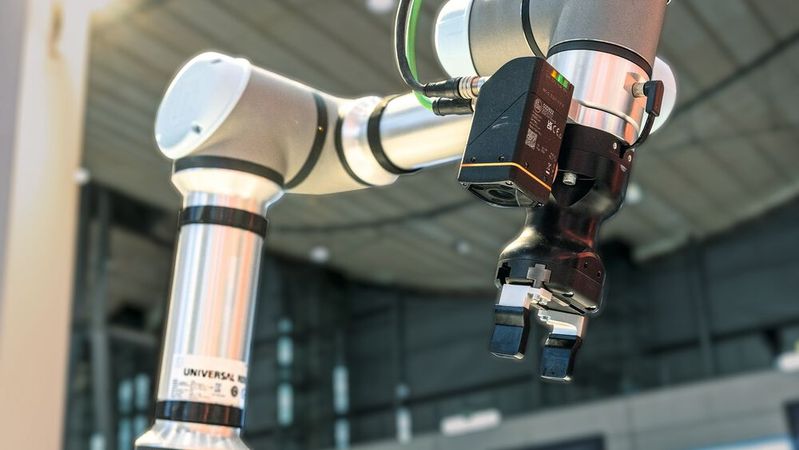
:quality(80)/p7i.vogel.de/wcms/82/ea/82ea0975563534fa0c32ce2c6235e62e/0123073305v1.jpeg "Smart vision sensors facilitate applications where the robot needs to recognize objects.(Image: IFM Electronic GmbH)")
:quality(80)/p7i.vogel.de/wcms/ea/19/ea19bfaedd0e84d38745da2547fab635/0120455166v1.jpeg "With the calibration sheet, the O2D500 can be calibrated to the robot's coordinate system with just a few clicks.(Image: IFM Electronic GmbH)")
:quality(80)/p7i.vogel.de/wcms/62/ea/62ea1ebf5ddbc03be8275eacf9176fe1/0120446426v1.jpeg "The camera-based sensor O2D5 from IFM was developed for optical 2D object inspection.(Image: IFM Electronic GmbH)")
:quality(80)/p7i.vogel.de/wcms/c3/07/c3073d0131f5fca07e379af247cdf001/0123073252v1.jpeg "Smart vision sensors facilitate applications where the robot needs to recognize objects.(Image: IFM Electronic GmbH)")
:quality(80)/p7i.vogel.de/wcms/9a/ae/9aaef670837541d2b6f435f6636f2201/0124995913v1.jpeg "The fully automatic 3D capture system operates without traditional teaching. (Image:Fraunhofer IGD)")
:quality(80)/p7i.vogel.de/wcms/2c/49/2c49d9f825dc45c046a7f14f5564fad6/0127037962v1.jpeg "Industrial image processing enables quality assurance in semiconductor manufacturing. (Image: ©Ali - stock.adobe.com)")