Zephyr is a young open-source RTOS with many parallels to Linux. However, it's not just a downsized Linux, but a standalone operating system. Why another open-source OS?
Zephyr was originally the name of a Greek wind deity. This probably inspired the creators of the new RTOS to use a kite in the logo.
(Image: Vogel Communications Group)
Linux has its limits where small microcontrollers are to be used and memory and flash resources are extremely scarce. The lower limits for Linux on systems without an MMU are considered to be 4 MB of RAM and 3 MB of flash. With an MMU, it's 8 MB of RAM. This is an extremely reduced Linux system, which no longer includes most of the great features that define Linux. The overhead caused by the operating system is significantly larger than with specialized operating systems for small microcontrollers.
A typical example is the Cortex processors. While Linux plays a major role in the Cortex-A series, the Cortex-M processors are no longer its domain. This is where smaller operating systems come into play.
Zephyr: Architecture and components
Zephyr is a real-time operating system that can be used from small microcontrollers to large systems. Through a configuration menu, the components to be created can be configured. The configuration includes not only the features of the operating system but also the selection of drivers, libraries, and user applications.
Since there is only one executable, these applications run as threads just like the operating system's housekeeping. This makes it possible to offer the user a shell with a considerable selection of commands while simultaneously recording data and responding to interrupts.
The following sections provide more detailed information on the architecture of the operating system.
Priority-Based Preemptive Scheduling
The scheduler recognizes priorities, where a smaller numerical value means higher priority. Higher priority means that tasks with lower priority are interrupted, thus a priority-based preemptive scheduling, as we know from many other real-time operating systems.
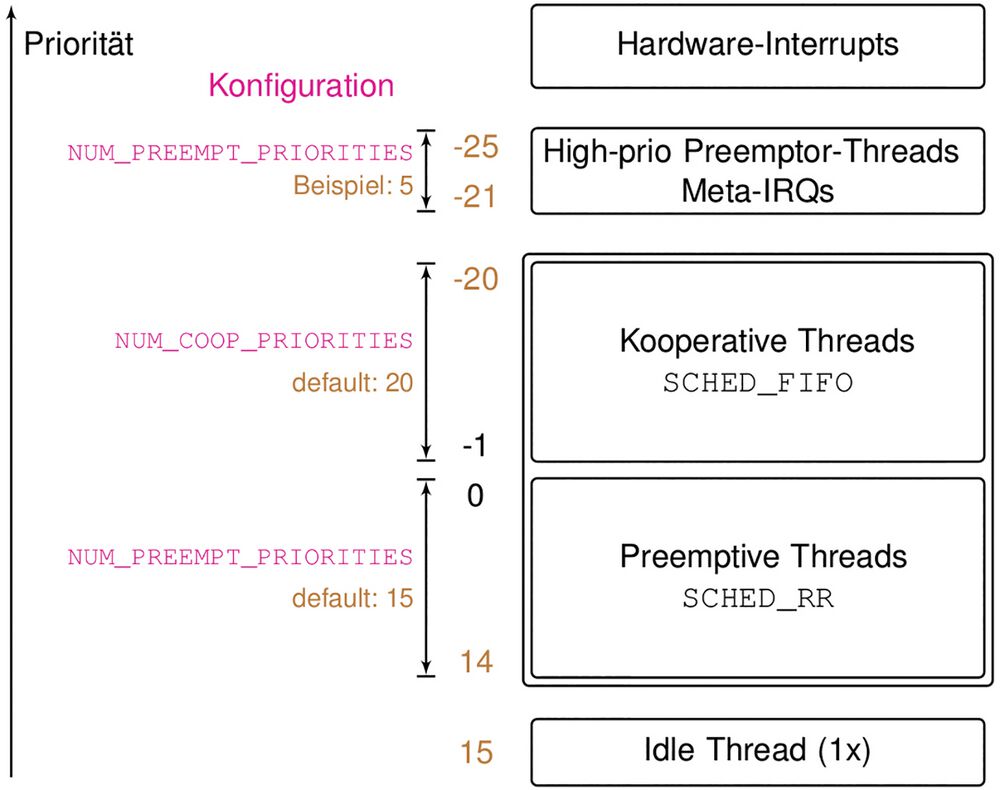
Image 1: In the priority range supported by the scheduler, there are configurable areas for different thread types.
(Image:IT Klinger)
A special feature is the priority ranges where different thread types are located, as can be seen in Image 1:
Hardware interrupts are above the scheduler and interrupt it
Optional high negative priorities (in Figure 1: -21 ... -25): With the configuration variable NUM_PREEMPT_PRIORITIES, high-priority preemptor threads can be defined and used as meta-interrupt service routines. These are used to remove code from the hardware interrupt service routines and to execute it before the rest of the scheduling. These are essentially prioritized as high as an ISR but are nonetheless scheduled. Hence the term "Meta-IRQ".
Negative priorities (in Image 1: Prio -1 ... -20): Cooperative threads (SCHED_FIFO) do not interrupt each other on the respective priority level and are scheduled in the order they became ready to compute.
Positive priorities (in Image 1: Prio 0 ... 14): Preemptive threads (SCHED_RR) which are scheduled on the respective priority level in a round-robin manner.
Idle Thread (in Image 1: Prio 15): Exactly one thread at the lowest priority level.
In addition to the described priority divisions, a deadline scheduling can also be optionally used (CONFIG_SCHED_DEADLINE). With this method, tasks within a priority level are scheduled according to the Earliest-Deadline-First procedure. This means that the task with the most urgent deadline is addressed first. This method is applied to each priority level, so that tasks of lower priority but with shorter deadlines would not be addressed.
This is how memory management works
In a single Zephyr executable, there are many threads. A number of them are created by the operating system depending on the configuration (e.g., network, shell, logging, tracing, ...) and additional ones can be created by the application. These threads work on the same memory and use the same address pool. However, the MPU (Memory Protection Unit) is utilized to make only the designated memory accessible to each thread. This prevents threads from overwriting each other's memory.
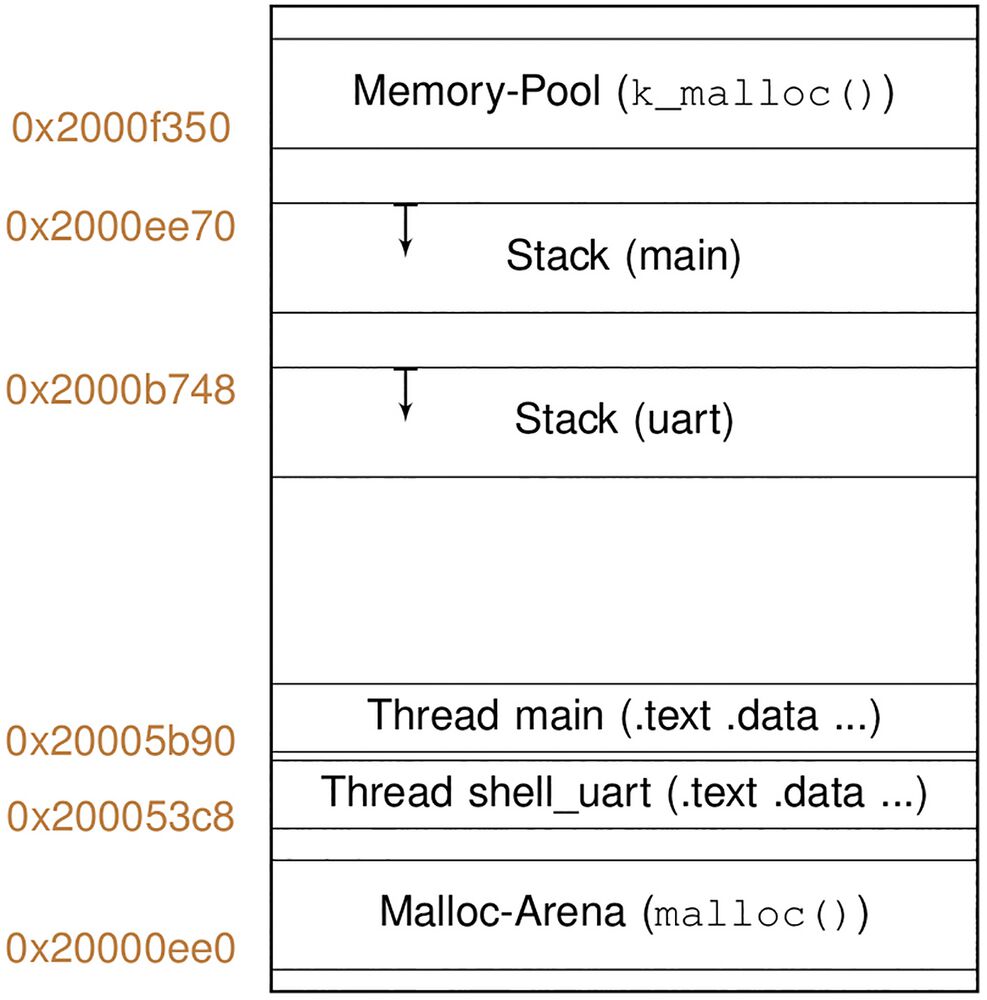
Image 2: Example of a memory layout with two threads, kernel and user space heap. For clarity, the remaining threads have been omitted compared to the screen output (Image 4).
(Image:IT Klinger)
In Image 2, one can see the basic division of the available memory. For clarity, only the code, data, and stack areas for two threads are shown. In a real system, there are usually significantly more threads with their memory areas. The memory usage is configured and determined at build time:
Memory pool for allocations in the kernel using k_malloc()
Malloc arena for the user space, requested with the function malloc()
Stack of the subsystems
Interrupt stack
Stack of the main thread
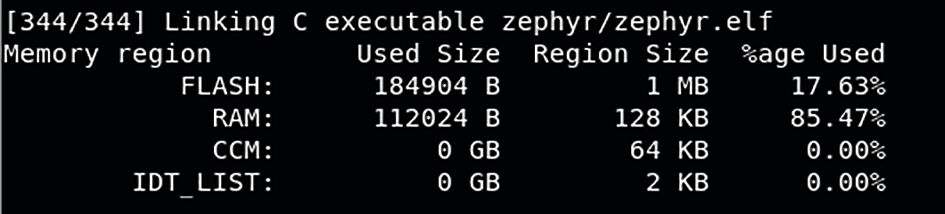
Image 3: Example from a build process
(Image:IT Klinger)
The size of the executable results from the linking process. From these individual memory areas, the build process can calculate whether the available memory is sufficient at all, and if not, the build is terminated with an error. In the successful case, a summary of memory usage is displayed. Image 3 shows an example from a build process.
Date: 08.12.2025
Naturally, we always handle your personal data responsibly. Any personal data we receive from you is processed in accordance with applicable data protection legislation. For detailed information please see our privacy policy.
Consent to the use of data for promotional purposes
I hereby consent to Vogel Communications Group GmbH & Co. KG, Max-Planck-Str. 7-9, 97082 Würzburg including any affiliated companies according to §§ 15 et seq. AktG (hereafter: Vogel Communications Group) using my e-mail address to send editorial newsletters. A list of all affiliated companies can be found here
Newsletter content may include all products and services of any companies mentioned above, including for example specialist journals and books, events and fairs as well as event-related products and services, print and digital media offers and services such as additional (editorial) newsletters, raffles, lead campaigns, market research both online and offline, specialist webportals and e-learning offers. In case my personal telephone number has also been collected, it may be used for offers of aforementioned products, for services of the companies mentioned above, and market research purposes.
Additionally, my consent also includes the processing of my email address and telephone number for data matching for marketing purposes with select advertising partners such as LinkedIn, Google, and Meta. For this, Vogel Communications Group may transmit said data in hashed form to the advertising partners who then use said data to determine whether I am also a member of the mentioned advertising partner portals. Vogel Communications Group uses this feature for the purposes of re-targeting (up-selling, cross-selling, and customer loyalty), generating so-called look-alike audiences for acquisition of new customers, and as basis for exclusion for on-going advertising campaigns. Further information can be found in section “data matching for marketing purposes”.
In case I access protected data on Internet portals of Vogel Communications Group including any affiliated companies according to §§ 15 et seq. AktG, I need to provide further data in order to register for the access to such content. In return for this free access to editorial content, my data may be used in accordance with this consent for the purposes stated here. This does not apply to data matching for marketing purposes.
Right of revocation
I understand that I can revoke my consent at will. My revocation does not change the lawfulness of data processing that was conducted based on my consent leading up to my revocation. One option to declare my revocation is to use the contact form found at https://contact.vogel.de. In case I no longer wish to receive certain newsletters, I have subscribed to, I can also click on the unsubscribe link included at the end of a newsletter. Further information regarding my right of revocation and the implementation of it as well as the consequences of my revocation can be found in the data protection declaration, section editorial newsletter.
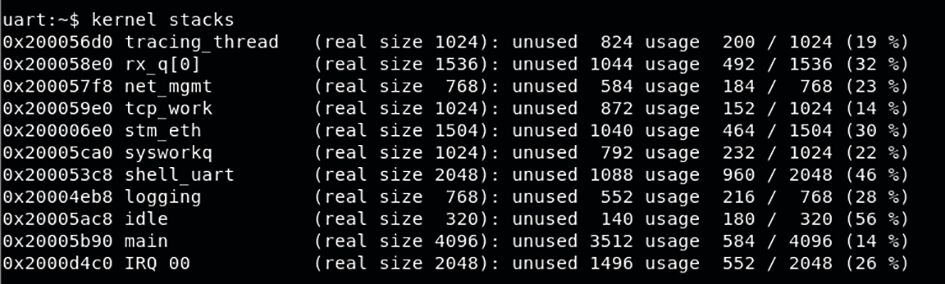
Image 4: Overview of the existing threads and their maximum stack usage so far
(Image:IT Klinger)
If you have configured the target system with a shell and thread monitoring, you get an overview of the existing threads and their maximum stack usage so far with the command "kernel stacks", see Image 4.
Once you have thoroughly tested the system, you can potentially optimize the stack usage based on these values to save memory space.
Timer events and sleep functions
In Zephyr, the time base is defined with the configuration variable CONFIG_SYS_CLOCK_TICKS_PER_SEC. Timer events or sleep functions can be used with this granularity. If a periodic system tick is used (CONFIG_TICKLESS_KERNEL is not set), then periodic interrupts are generated at this frequency.
Since each interrupt is associated with a certain overhead, the frequency cannot be increased indefinitely. A realistic value, which is still usable with our microcontrollers, would be for example 10 kHz. With this value, the temporal resolution is limited to 100 µs, which is too coarse-grained for many applications.
On the other hand, if you configure a tickless kernel (CONFIG_TICKLESS_KERNEL is set), timer events are processed entirely on an event basis and by eliminating the periodic tick and its base load, significantly more granular time handling can be achieved. An increase in time granularity (CONFIG_SYS_CLOCK_TICKS_PER_SEC) to 1 µs then becomes realistic even for small microcontrollers.
In summary, it can be emphasized that the variable CONFIG_SYS_CLOCK_TICKS_PER_SEC defines the frequency of timer tick interrupts in a tick-based kernel and sets the minimum time resolution in a tickless kernel. Therefore, in a tick-based kernel, this frequency is cautiously increased to avoid overwhelming the system with a flood of timer interrupts, while in a tickless system, it is significantly increased to benefit from a high time resolution.
Configuration and build process
A meta-tool called "west" serves as an interface to the configuration, build, and debug process. From this tool, all operations can be initiated and executed.
Zephyr – the gentle west wind
Zephyr, translated as "the one coming from the mountain“, is a wind deity from Greek mythology, embodying the (gentle) west wind. In antiquity, Zephyr was revered as a harbinger of spring and "ripening of the crops". This comes full circle to author Andreas Klinger, who is not only a software expert but also an ecological grain farmer: www.it-klinger.de.
Regarding Device Tree and configuration, there are two levels – that of the board and of the project. While a Device Tree describes the used board and is part of the Zephyr repository, it is complemented by the extensions and modifications required for the project. Both levels are located in different directories, ensuring high reusability.
The configuration is menu-driven and similar to that of the Linux kernel. In the project directory, there is a subdirectory called "board/". There, you can find the device tree fragment for each board that can be used with the project.
The Zephyr repository contains a deep directory hierarchy. Important subdirectories for developers are:
arch/$ARCH/: ($ARCH stands for the architecture, e.g., "arm") Architecture-dependent code (interrupt vectors, fault handling, timer, ...)
dts/$ARCH/$SOCVENDOR/: ($SOCVENDOR stands for the SOC manufacturer, e.g., "st") Device tree includes of the SOCs with basic, reusable components
soc/$ARCH/${SOCVENDOR}_$SUBARCH/: ($SUBARCH stands for the sub-architecture, e.g., "stm32") Adjustments for the SOC (System-On-Chip)
board/$ARCH/$BOARD/: ($BOARD stands for the board, e.g., "olimex_stm32_e407") Adjustments to a specific board (configuration, device tree, documentation, ...)
kernel/: Zephyr kernel with its central, architecture-independent code (timer, scheduler, IPC, driver model, ...)
subsys/: Subsystems as part of Zephyr (logging, shell, tracing, bus systems, ...)
drivers/: Driver implementations
lib/: Libraries (C-Library, Posix, OS, ...)
include/: Include files
modules/: Optional components
samples/: Example projects for the use of Zephyr features, drivers, sensors, networking and much more
doc/: Documentation
Summary
Zephyr is a young open-source RTOS with many parallels to Linux. However, it is not simply a downsized Linux, but a standalone operating system. For some features, you have to look closely, as mechanisms that are identically named compared to Linux are used slightly differently. The scheduling mechanisms are examples of this. (jw)
Zephyr – the gentle west wind
Zephyr, translated as "the one coming from the mountain", is a wind deity from Greek mythology, embodying the (gentle) west wind. In antiquity, Zephyr was revered as a harbinger of spring and "ripening of the crops". This comes full circle to author Andreas Klinger, who is not only a software expert but also an ecological grain farmer: www.it-klinger.de.



:quality(80)/p7i.vogel.de/wcms/dd/08/dd086510d9ae7b50181f6070e4463b44/0129363730v1.jpeg "Typical application for ionizing devices: Wrapping films. (Picture: ©Adobe Stock/SMC)")
:quality(80)/p7i.vogel.de/wcms/35/57/3557c819943c53acec41a0ccba87da4f/0130049064v1.jpeg "Researchers at the Fraunhofer IWU in Chemnitz have long known that many typical sheet metal parts can be manufactured more cost-effectively using hollow embossing rollers. Now there is news to report ... (Image:Fraunhofer IWU)")
:quality(80)/p7i.vogel.de/wcms/59/02/590246e3b3f415c65edbee377c14ca77/26-06-pi-fraunhofer-iws-41450-direktplattieren-pic-01-7771x4369v1v1.jpeg "The Fraunhofer IWS has developed the new \"direct laser cladding\" process, which creates a functional layer directly on the base body by applying a strip-shaped metal to rotationally symmetrical components in a spiral and bonding it locally by laser. (Image:Christoph Wilsnack/Fraunhofer IWS)")
:quality(80)/p7i.vogel.de/wcms/73/60/73608418789b1d9c393f5e2fa974eda2/0130209906v1.jpeg "The robots of the X6 generation from b+m enable very high painting quality and are also particularly compact and easy to maintain. (Image:Beckhoff)")
:quality(80)/p7i.vogel.de/wcms/78/e9/78e9188c25a8a94e67c34c9bf8ffe495/visual-agile-20robots-20and-20google-20deepmind-20partner-20to-20bring-20intelligence-20to-20robotics-2500x1406v1v1.jpeg "Together, the partners are developing adaptable, intelligent robots for a wide range of applications (Image:Agile Robots SE)")
:quality(80)/p7i.vogel.de/wcms/e7/66/e7669ecf0260ae8fc54c214e34e4902a/0130316817v1.jpeg "Siemens and Palo Alto Networks offer tested cybersecurity solution for industrial 5G. (Image:Siemens)")
:quality(80)/p7i.vogel.de/wcms/9f/55/9f55324832c4f426958031375124d9de/siemens-20ubtech-20hmnd-1920x1079v1v1.png "Ready for the factory floor: While Ubtech is planning mass production, Siemens is already testing humanoids in real factory applications in Erlangen. (Image:Siemens)")
:quality(80)/p7i.vogel.de/wcms/11/36/113695ed260e29c8c2d9d39dc5f9d869/0130213768v1.jpeg "AI can work cheaply in China and deliver the results rapidly all over the world. (Image:Dall-E / AI-generated)")
:quality(80)/p7i.vogel.de/wcms/62/5f/625f41e87ebfef156a98c8e6393e32fd/0130211654v1.jpeg "Axial flux motors have some advantages over radial flux motor—but their production is currently still expensive. (Image:RWTH Aachen University)")
:quality(80)/p7i.vogel.de/wcms/77/9b/779b0685d010dfe45c9c2cb1cfecd467/0128886425v1.jpeg "The BlueEye is the first \"real\" hyperspectral camera for the UV range and covers the wavelength range from 220 to 380nm. (Image:Inno-spec GmbH)")
:quality(80)/p7i.vogel.de/wcms/e4/51/e451d52ce0182fb0aaa46a5774f832ef/26-04-pi-fraunhofer-iws-21160-bioslide-pic-01-4128x2321v1v1.jpeg "With the BioSlide research project, the Fraunhofer IWS is investigating how sliding systems can be designed to be more sustainable and energy-efficient. New materials can be tested in a particularly application-oriented manner on this plain bearing test stand. (Image:Fraunhofer IWS)")
![Thanks to advanced 3D printing technology, a more efficient use of resources should contribute to lower-emission aviation—this is the goal of ['skai]-lab. (Image:Oleksandr Pashchenko - stock.adobe.com / AI-generated)](https://cdn1.vogel.de/nghHNSbySccfOjG3n1qCA-FVOjQ=/288x162/smart/filters:format(jpg):quality(80)/p7i.vogel.de/wcms/62/64/626424c97a16e69f871bf216c9629c2a/adobestock-1927043193--c2-a9-20oleksandr-20pashchenko-20-e2-80-93-20stock-adobe-com-ki-generiertv1v1.jpeg "Thanks to advanced 3D printing technology, a more efficient use of resources should contribute to lower-emission aviation—this is the goal of ['skai]-lab. (Image:Oleksandr Pashchenko - stock.adobe.com / AI-generated)")
:quality(80)/p7i.vogel.de/wcms/c3/c4/c3c4ce270b083eeac55654148611f064/0130237945v1.jpeg "China is not giving up on hydrogen, but is intensifying its efforts. (Image:freely licensed from Pixabay)")
:quality(80)/p7i.vogel.de/wcms/4e/c0/4ec0bd19390b169edfa23677373dcdf1/0130260089v1.jpeg "Renewable fuels can supply European road traffic, according to a study. (Image:Aral)")
:quality(80)/p7i.vogel.de/wcms/6f/c9/6fc9050301d745cad25585c6780f8f51/0130197341v1.jpeg "Production facilities are a worthwhile target and are therefore at risk. (Image:ABB Robotics)")
:quality(80)/p7i.vogel.de/wcms/b6/62/b662adc2cec8227d8172509bbfb6ee42/25c0207-107-4961x2789v1v1.jpeg "The GLB is the second model based on Mercedes' new MMA platform. Apparently, Geely's platform is better and cheaper, which is why the two companies are negotiating a partnership. (Image:Mercedes-Benz)")
:quality(80)/p7i.vogel.de/wcms/4d/dd/4dddf438e91f394c04a095dbfd109d1c/0130236430v1.jpeg "Measurement modules: The 720301 module in combination with the SL2000 enables RMS and power calculations, among other things. (Image:Yokogawa)")
:quality(80)/p7i.vogel.de/wcms/61/fc/61fcf95f5cca15494ad18343901ae585/0130317237v1.jpeg "With the AGI CPU, Arm says it is taking a \"historic step\": With the processor aimed at AI in data centers, the company is presenting itself for the first time as a provider of its own chips, not just as a pure IP licensor. (Image:Arm)")
:quality(80)/p7i.vogel.de/wcms/82/90/8290dfe3595b6c6b33726ae8b76172c7/0130319587v1.jpeg "The concept image illustrates how the pattern of tiny protrusions and depressions created on the substrate (MgO, bottom) controls the arrangement of atoms in the superconducting material (YBCO, top). At the interface between the two layers, an electronic structure enables superconductivity to occur at higher temperatures than previously possible. (Image:Chalmers University of Technology / Riccardo Arpaia)")
:fill(fff,0)/images.vogel.de/vogelonline/companyimg/76800/76895/65.jpg "FAULHABER_120mm.jpg ()")
:fill(fff,0)/p7i.vogel.de/companies/67/eb/67eba621ef6ea/logo2.png "logo2 (Wuxi InfiMotion)")

:quality(80)/p7i.vogel.de/wcms/ba/d4/bad4381a8d47b890932f93bc4dfbdfed/0111323802v1.jpeg "Software functions are visible on the displays. However, a comprehensive IT system is needed to coordinate all systems with each other. There are different operating systems for this. (Image:Volkswagen AG)")
:quality(80)/p7i.vogel.de/wcms/b8/1e/b81e92a57d9594690e76a7687788999f/0126146178v1.jpeg "MIPI I3C Interop Workshop in Munich (Image:Angelika Güc)")