Rigid CAE workflows slow down simulation: When every geometry change triggers manual update loops, it becomes time-consuming, error-prone, and frustrating. Ansys Workbench offers a different solution for this.
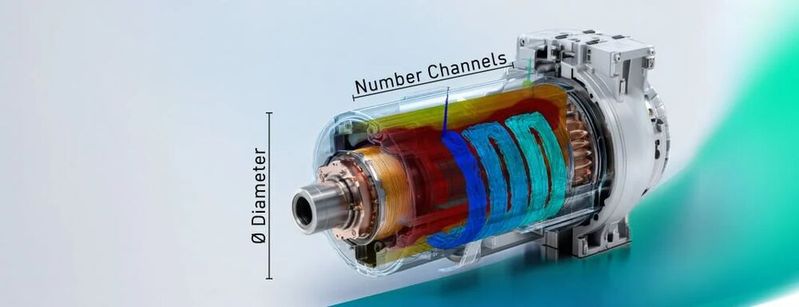
How parameterization with Ansys works in practice is demonstrated here, among other things, using the example of a simulated cooling channel.
(Image: Adobe Stock/CADFEM Germany GmbH)
Do you know this? After the first simulation, changes are needed. When updating the geometry, painstakingly set boundary conditions, material assignments, or contacts are lost. It's particularly frustrating if complex defeaturing was previously done to prepare the model for the simulation. Every subsequent change then means manual work and potential sources of error.
Parametrization provides a solution here. It allows geometric changes to be implemented efficiently and consistently. Instead of manually updating each adjustment in the CAD software and then updating the simulation model, the model adjusts itself automatically. These intelligent geometries enable optimizations, sensitivity analyses, and automated workflows. This increases the traceability of decisions and accelerates product development. In short: those who use parametrization lay the foundation for efficient simulation processes.
Bidirectional Working With Other CAD tools
Many CAD systems offer extensive capabilities for working parametrically. Through the bidirectional CAD interface, such models can be directly integrated into the simulation tool Ansys Workbench. When a parameter change is made via the Parameter Set in Ansys, the associated CAD tool is used to update the geometry. To do this, the corresponding geometry is first loaded into a geometry cell in Ansys Workbench. For Workbench to recognize the parameters, they must be uniquely named in the CAD tool. This can be accomplished with a prefix in the parameter name, such as "ANS_". The prefix can be checked and adjusted in the "Properties". The parameters appear in Ansys Mechanical in the structure tree under Details for each body. A click on the checkbox shows a "P". This allows lengths, angles, or other dimensions to be specifically controlled and varied in studies using the Parameter Set.
History-Based Modeling Vs. Direct Modeling
History-based modeling is the standard for many CAD systems. The model is created step by step, with all features documented in the model tree. Ansys Discovery, the standard modeler from Ansys, uses a different approach: so-called Direct Modeling. This method eliminates a feature history, listing parts, surfaces, and curves in the structure tree instead. Users directly edit the existing geometry—ideal for quick defeaturing and flexible adjustments. For example, small features such as fillets, chamfers, or logos can be easily removed from the geometry. This makes preparation for simulation particularly efficient.
History Tracking in Ansys Discovery
If no CAD interface is available or the CAD model is not designed with a focus on parametric variation, history-based modeling can still be performed in Ansys Discovery using the History Tracking mode. This builds a feature history, similar to traditional CAD systems. However, caution is advised: switching back to Direct Modeling is not possible—the history will be lost. Therefore, it is worth having a strategy for the model setup before starting the tracking.
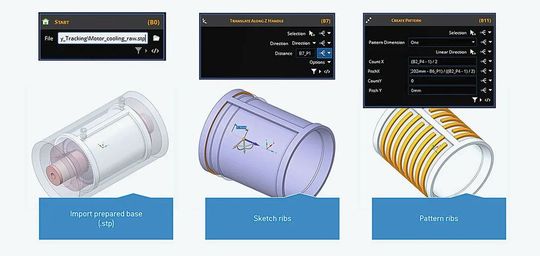
With the History Tracking mode, history-based modeling can be performed in Ansys even if no CAD interface is available.
(Image: Cadfem)
A practical feature is that after loading a geometry, it forms the first "block"—starting from scratch is not necessary, as demonstrated here with the example of motor cooling. Its base geometry is complex (windings, bearings, etc.), but the focus is on the heat sink. Therefore, with active History Tracking, the base (.step) is first imported. The prepared area of the cooling channels is then specifically modeled. Each editing step is saved as a block and remains editable. Initially, surfaces are created in the empty pocket, which are then patterned to form the channels. In the blocks, values such as spacing and thickness of the fins can be parameterized. There is even an option to establish dependencies between created parameters. For instance, the spacing in the pattern can be derived from the available length, the width, and the number of channels.
Sketches created during History Tracking can also be parameterized. By using the sketch symbol, you can switch to the sketch and edit it afterward. To make dimensions available outside of the sketch in the block, dimensions are set within the sketch. These appear in the block after the sketch is edited and can be used as parameters there. Dimensions that are not dimensioned remain hidden in the blocks. Additionally, constraints can also be applied within sketches to enforce restrictions such as parallelism, coincidence, or tangency.
Date: 08.12.2025
Naturally, we always handle your personal data responsibly. Any personal data we receive from you is processed in accordance with applicable data protection legislation. For detailed information please see our privacy policy.
Consent to the use of data for promotional purposes
I hereby consent to Vogel Communications Group GmbH & Co. KG, Max-Planck-Str. 7-9, 97082 Würzburg including any affiliated companies according to §§ 15 et seq. AktG (hereafter: Vogel Communications Group) using my e-mail address to send editorial newsletters. A list of all affiliated companies can be found here
Newsletter content may include all products and services of any companies mentioned above, including for example specialist journals and books, events and fairs as well as event-related products and services, print and digital media offers and services such as additional (editorial) newsletters, raffles, lead campaigns, market research both online and offline, specialist webportals and e-learning offers. In case my personal telephone number has also been collected, it may be used for offers of aforementioned products, for services of the companies mentioned above, and market research purposes.
Additionally, my consent also includes the processing of my email address and telephone number for data matching for marketing purposes with select advertising partners such as LinkedIn, Google, and Meta. For this, Vogel Communications Group may transmit said data in hashed form to the advertising partners who then use said data to determine whether I am also a member of the mentioned advertising partner portals. Vogel Communications Group uses this feature for the purposes of re-targeting (up-selling, cross-selling, and customer loyalty), generating so-called look-alike audiences for acquisition of new customers, and as basis for exclusion for on-going advertising campaigns. Further information can be found in section “data matching for marketing purposes”.
In case I access protected data on Internet portals of Vogel Communications Group including any affiliated companies according to §§ 15 et seq. AktG, I need to provide further data in order to register for the access to such content. In return for this free access to editorial content, my data may be used in accordance with this consent for the purposes stated here. This does not apply to data matching for marketing purposes.
Right of revocation
I understand that I can revoke my consent at will. My revocation does not change the lawfulness of data processing that was conducted based on my consent leading up to my revocation. One option to declare my revocation is to use the contact form found at https://contact.vogel.de. In case I no longer wish to receive certain newsletters, I have subscribed to, I can also click on the unsubscribe link included at the end of a newsletter. Further information regarding my right of revocation and the implementation of it as well as the consequences of my revocation can be found in the data protection declaration, section editorial newsletter.
What Should Be Considered With Geometry Parameters?
The choice of the right method depends on the goal: for complex geometries, a history-based approach with a clear build strategy is recommended. For simple variations, Direct Modeling is often sufficient. Initially, it can be beneficial not to fully parameterize every detail within the components but to start with a limited selection of parameters. This helps to better understand the fundamental functions and approaches while identifying potential pitfalls.
Future-Proof Authentication with Universal RFID Readers



:quality(80)/p7i.vogel.de/wcms/c2/e5/c2e58a3c742e1a82f7d4725fa571dd26/0130305463v1.jpeg "Europe has a Primus for humanoids! After the agreement to cooperate and found Primus Robotics (from left): Juan Etxebarria, Head of Business Development at Fagor Arrasate, and Alejandro Echeverría, Managing Director of Funditec Intelligence ... (Picture:Fagor Arrasate)")
:quality(80)/p7i.vogel.de/wcms/b8/90/b8906166b2acd38549ad7db16d37c3b8/opening-20ceremony-2400x1349v1.jpeg "SIMTOS 2026 Opens on April 13, Held at KINTEX for 5 Days Through April 17. (Source: SIMTOS)")
:quality(80)/p7i.vogel.de/wcms/4b/bc/4bbcff159df32ad396280fcbcdcc7c1f/0130537896v1.jpeg "A Westcotec camera monitors the speed of forklift trucks in an industrial hall. (Image:Westcotec)")
:quality(80)/p7i.vogel.de/wcms/d7/86/d786a07d3be5e5456457c567631ac884/0130409526v1.jpeg "According to the manufacturer, the ULT 2500.1 extraction and filter system is designed for the reliable filtration of large quantities of dust in various industrial applications. (Image:ULT)")
:quality(80)/p7i.vogel.de/wcms/94/45/9445c71536166caf0c5206f394cddf38/0130559574v1.jpeg "The Siemens Infrastructure Transition Monitor is a Siemens study published every two years. (Image:Siemens)")
:quality(80)/p7i.vogel.de/wcms/8e/b9/8eb9066e31655a551f25a256c949cc19/0130542642v1.jpeg "Symbolic image: Robotics manufacturers are on the way to mass production of humanoids. (Image:Dall-E / AI-generated)")
:quality(80)/p7i.vogel.de/wcms/0e/02/0e02d56de3a46514ab0ee9628082b595/0113143253v1.jpeg "In our China Market Insider, we regularly provide you with relevant information directly from China. (Image:© Eisenhans - stock.adobe.com)")
:quality(80)/p7i.vogel.de/wcms/57/2e/572eca8289966c32964ef4206d6240ff/0130350923v1.jpeg "Agentic AI refers to systems that not only evaluate information, but can also derive action steps from it and support operational processes. (Picture: ©GamePixel - stock.adobe.com)")
:quality(80)/p7i.vogel.de/wcms/7a/1a/7a1a6035f21cbb53d373d759944a680e/bild-01-co-improve-agile-produktentwicklung-systemkomplexit-c3-a4t-governance-compliance-finalv1.png "The agile framework - extended for product development in the regulatory environment. (Source: CO-Improve)")
:quality(80)/p7i.vogel.de/wcms/cb/02/cb02d24324dfacafb2f0a2228065eb39/0130583507v1.jpeg "Lennart Baramsky, designer at BMW Group Designworks, shows that design today is created in networked systems—no longer in the classic order of idea, sketch and elaboration. (Picture:Designworks Munich)")
:quality(80)/p7i.vogel.de/wcms/14/27/142774c1c27785d56d8ab10131fb648d/adobestock-844361487--c2-a9-20jk-kyoto-20-e2-80-93-20stock-adobe-com-ki-generiertv1.jpeg "Large-scale or rapidly growing IoT scenarios in factory automation can often only be implemented using conventional cabling with considerable infrastructure costs. Wireless technologies can offer great added value when used in a complementary and sensible way. (Source: © JK_kyoto - stock.adobe.com / AI-generated)")
:quality(80)/p7i.vogel.de/wcms/3d/bf/3dbfb672adb0446d40669e6403baf3b6/adobestock-1421003638--c2-a9-20tenpixels-20--20stock-adobe-comv1.jpeg "Many processes in design and development are undergoing change. PLM solutions ensure greater efficiency thanks to transparency and data consistency. (Source: © TenPixels - stock.adobe.com)")
:quality(80)/p7i.vogel.de/wcms/cf/3c/cf3c0062175086734baf2df773155fad/0130592310v1.jpeg "Bosch's Cockpit & ADAS Integration Platform integrates the previously separate infotainment and driver assistance functions into one system-on-chip. (Image:Bosch)")
:quality(80)/p7i.vogel.de/wcms/0b/64/0b64fa6f43a1f9c8e6fd60055f9d27ed/0130580085v1.jpeg "Stellantis is negotiating with Leapmotor about an Opel model to be developed in China. (Image:Opel)")
:quality(80)/p7i.vogel.de/wcms/87/f8/87f87cbd3669c82cf8a929f50541f806/0130618626v1.jpeg "Microchip's new hybrid MCU system-in-package SAM9X75 enables MPU computing power with the familiar development environment of MCU-based designs, (Image:Microchip)")
:quality(80)/p7i.vogel.de/wcms/6b/63/6b635ddc12a03c966cc8c6e836dcdcb2/0130616488v1.jpeg "Keep your hands off the wheel, it may soon be said throughout Europe! Because Tesla wants to introduce its \"Full Self Driving\" (FDS) driver assistance system, at least in the \"Monitored\" version ... (Picture:Tesla)")
:quality(80)/p7i.vogel.de/wcms/00/0f/000f67225299d0ad9123896d49aa25e5/0130564619v1.jpeg "Infrastructure for AI agents: Intel and Sambanova share computing load across three processor types (Image:Gemini / AI-generated)")
:quality(80)/p7i.vogel.de/wcms/e4/54/e454fcca7009b106cda2e228992a7a47/0130565746v1.jpeg "Hand in hand: Intel CEO Lip-Bu Tan enters into a strategic partnership with his company in the grandiose Terafab project. But the scope, timeframe and purpose remain vague. (Image:SemWiki/X)")
:quality(80)/p7i.vogel.de/wcms/22/32/22328957aafda3529c5b0069c0790595/0130537290v1.jpeg "Human knowledge, artificial intelligence: intelligent data processing directly at the point of use requires the interaction of AI, hardware expertise and concrete application experience. (Image:Dall-E / AI-generated)")
:quality(80)/p7i.vogel.de/wcms/ed/ff/edfff4eab0635db8530fcc8da1943fd4/0130612359v1.jpeg "Using a special microlens array, Korean researchers have developed a wide-angle camera that is less than 1 mm (0.04 inches) thick and offers a field of view of 140 degrees. (Image:freely licensed)")
:quality(80):fill(efefef,0)/p7i.vogel.de/wcms/67/ae/67ae0b9ac31f8/elatec-wp-universal-reader.png "Elatec WP Universal Reader")
:quality(80)/p7i.vogel.de/wcms/4c/21/4c21ad6e334d3c15981608c75ec6a628/0125867170v1.jpeg "We showcase solutions and tips that ensure greater efficiency in design. (Image:Kisters)")
:quality(80)/p7i.vogel.de/wcms/fa/e4/fae41f887d3922f4eb6693d95448499c/0126796995v1.jpeg "Autodesk University will take place this year from September 16 to 18, 2025. Participants can look forward to a diverse program focused on design and manufacturing. (Image:Autodesk)")