More and more extensive knowledge is required for system creation and programming and rapid further developments make conventional training difficult. A new learning method with virtual content, in which digital system twins can be used to set up and program self-made systems, allows for flexible, state-of-the-art learning.
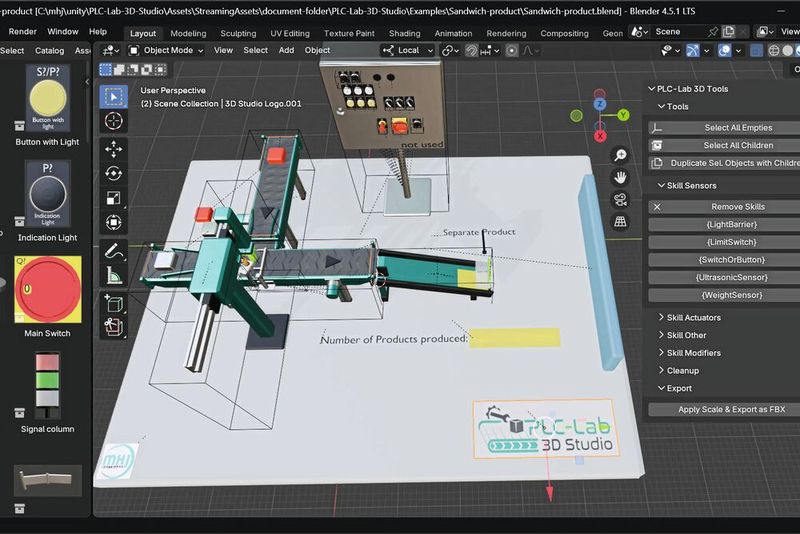
3D modeling software Blender with the integrated component catalog from MHJ-Software (left), the setup of a virtual system in the design area (central) and the specially developed plugin for skill configuration (right).
(Image: MHJ software)
As technology advances, learning and training methods must also change in order to keep pace with change. Here, too, digitalization has found its way in and uses the advantages of virtualization and digital twins for the training of PLC programmers. The PC-Lab 3D Studio software from MHJ—Software simulates typical mechatronic learning systems that are always state of the art. To further increase the practical relevance, the developers have created special interfaces and plug-ins with which the open source 3D software Blender can be seamlessly integrated into the workflow with PLC-Lab. Instead of using individual, pre-configured systems as before, individual, self-designed systems or system parts can now be used. The software now offers learning opportunities from budding designers to create models to trainees in the fields of mechatronics, electrical engineering or automation who take over the programming of the individual work processes.
Digital Twin With Real Advantages
Mapping different system scenarios in a virtual environment for training purposes has a whole range of advantages. Firstly, you can react flexibly and quickly to new trends, and secondly, expanding the digital twin costs nothing compared to real training systems and is also completely safe. Lecturers in the field of control technology can develop mechatronic models tailored to the curriculum, mechanical engineers can commission their systems or machines via virtual commissioning by linking them to a control system and thus check the functionality of the control program.
Gallery
In real training systems, processes such as drilling and milling are usually only simulated for cost and safety reasons, as vapors, chips, etc. can be produced here. In the digital twin, on the other hand, you can actually "drill and deburr" virtually and completely simulate errors in system design or programming, even for deep holes. In this way, it may be possible to detect errors that remain undetected when drilling is only simulated, such as premature stops, lack of cooling or if chips are not removed correctly.
Safe Learning
Trainees can learn a lot from this without any danger if a drill breaks or accumulating chips block the mechanics. Other typical scenarios that are illustrated include the transportation, processing, sorting and recognition of different workpieces. However, tasks such as quality checks, complete or simplified production processes, storage, fill level control, pick & place tasks and even precise positioning via drives can also be implemented virtually. This saves enormous costs compared to real training systems and also saves a lot of assembly time, which can be better used for learning content.
In order to further diversify such possibilities and also create special solutions for different industries in addition to the standard tasks, the training platform for collaboration with Blender has been expanded. This includes a fast import mechanism, an asset library with industrial components and a plugin that allows behavioral logic to be added to 3D objects. This means that individual plants can now also be created and new objects can be designed or imported.
Build Learning Program According to Requirements
PC-Lab 3D Studio uses Blender, a widely used and established 3D software that has a large user community and is also free of charge. The digital twin created with this software is then imported into PC-Lab 3D Studio and is ready for realistic system programming and a realistic 3D simulation. The system views can be freely selected in the room so that the "system operator" always has a clear view of all work processes.
To make it easier to get started, Blender already provides an object library with standard objects, such as actuators (sliding cylinders), sensors (optical, magnetic, capacitive) or conveyor belts, chutes, roller conveyors, etc. A large number of different system configurations can be quickly put together from these, for example by simply joining conveyor belts together using drag-and-drop. For new tasks or as an exercise for designers and advanced users, any number of individual objects can also be designed. This means that even very special systems can be created for industry-specific, practical training.
Date: 08.12.2025
Naturally, we always handle your personal data responsibly. Any personal data we receive from you is processed in accordance with applicable data protection legislation. For detailed information please see our privacy policy.
Consent to the use of data for promotional purposes
I hereby consent to Vogel Communications Group GmbH & Co. KG, Max-Planck-Str. 7-9, 97082 Würzburg including any affiliated companies according to §§ 15 et seq. AktG (hereafter: Vogel Communications Group) using my e-mail address to send editorial newsletters. A list of all affiliated companies can be found here
Newsletter content may include all products and services of any companies mentioned above, including for example specialist journals and books, events and fairs as well as event-related products and services, print and digital media offers and services such as additional (editorial) newsletters, raffles, lead campaigns, market research both online and offline, specialist webportals and e-learning offers. In case my personal telephone number has also been collected, it may be used for offers of aforementioned products, for services of the companies mentioned above, and market research purposes.
Additionally, my consent also includes the processing of my email address and telephone number for data matching for marketing purposes with select advertising partners such as LinkedIn, Google, and Meta. For this, Vogel Communications Group may transmit said data in hashed form to the advertising partners who then use said data to determine whether I am also a member of the mentioned advertising partner portals. Vogel Communications Group uses this feature for the purposes of re-targeting (up-selling, cross-selling, and customer loyalty), generating so-called look-alike audiences for acquisition of new customers, and as basis for exclusion for on-going advertising campaigns. Further information can be found in section “data matching for marketing purposes”.
In case I access protected data on Internet portals of Vogel Communications Group including any affiliated companies according to §§ 15 et seq. AktG, I need to provide further data in order to register for the access to such content. In return for this free access to editorial content, my data may be used in accordance with this consent for the purposes stated here. This does not apply to data matching for marketing purposes.
Right of revocation
I understand that I can revoke my consent at will. My revocation does not change the lawfulness of data processing that was conducted based on my consent leading up to my revocation. One option to declare my revocation is to use the contact form found at https://contact.vogel.de. In case I no longer wish to receive certain newsletters, I have subscribed to, I can also click on the unsubscribe link included at the end of a newsletter. Further information regarding my right of revocation and the implementation of it as well as the consequences of my revocation can be found in the data protection declaration, section editorial newsletter.
Educational institutions can use a digital twin as an interdisciplinary, joint project in which different specialist disciplines work together. Design engineers create the design drawings and cooperate with electrical engineers, mechatronics engineers and IT specialists to realize the digital twin.
Step By Step to the Digital Twin
The simulation environment is designed to make it easy to get started. The process can be divided into just six steps:
First, a 3D model is created with Blender,
then the objects are prepared; if they later have dynamic functions, they are marked with specific key words.
The objects are then exported as a 3D model.
The file is imported into PLC-Lab 3D Studio
and then assigned and configured the skills to the objects.
This is followed by virtual commissioning: The 3D model is switched to RUN mode and connected to a PLC or soft PLC.
Steps one to three are implemented in Blender, steps four to six with PLC-Lab 3D Studio. Errors are now often discovered during the simulation. Mechanical problems in the construction of the system, such as poorly positioned package deflectors that lead to a jam or protruding limiting plates or incorrectly set sensors or wrong actuators, are then usually easy to rectify in Blender. The project then has to be imported again and a new, improved system is available.
Get to the Bottom of Problems Quickly
Programming errors then need to be rectified, such as pusher movements that are too slow or too short in order to push parcels from the conveyor belt to the correct department or inadequate adjustment of the conveyor belt speed in order to separate goods. Such problems can also be quickly identified in the simulation. Once the system is running, the processes can be further optimized by fine-tuning the process-relevant parameters. If the standard objects from the library are not sufficient for a smooth process, you can also add your own objects at this point.
The procedure largely corresponds to that used for complex systems in industry. CAD data can also be imported as the basis for the Blender model. The flexibility of PLC-Lab also applies to the wide range of common industrial software products with which the system is compatible, including S7-PLCSIM from the TIA Portal or real S7-300/1200(G2) /1500 controllers from Siemens, Codesys V3-based controllers linkable via OPC/UA and many more. PLC-Lab 3D Studio in combination with the 3D software Blender is therefore ideal for learning with different control programs, as they are also common in industrial practice.
About MHJ-Software GmbH & Co. KG
MHJ-Software GmbH & Co. KG is an engineering company based in Bretten, Germany. The company has been involved with Simatic STEP5 since 1992 and with Simatic STEP7 since 1997. While the initial focus was on the development of standard software for Simatic STEP7, over the years the focus has increasingly shifted to the simulation of mechatronic systems and machines.
Through the development of software solutions in the areas of simulation, programming, diagnostics, communication and visualization, MHJ-Software has built up in-depth expertise and specialized know-how.



:quality(80)/p7i.vogel.de/wcms/53/f7/53f7dadbe4d656a3fd4f4077445f29f6/0129828707v1.jpeg "Thanks to its compact design and drilling/unscrewing function, the Fire Birdie is suitable for applications with limited installation space and frequent tool changes. (Image:Marcel Kraibühler)")
:quality(80)/p7i.vogel.de/wcms/da/4d/da4da8d34671dc6bce80e496212de877/0129850788v1.jpeg "Mate-XT Go supports the arms and shoulders during overhead work and repetitive tasks and is designed to significantly reduce muscle strain in everyday working life. (Image:Comau)")
:quality(80)/p7i.vogel.de/wcms/95/97/95976dbaac68b249eb65e74c5aad5300/0129651893v1.jpeg "The C2.0 centric clamps, the S2 fixed jaw clamps and the \"gredoc\" zero-point clamping systems are used for machining the raw parts. Fastening is carried out with width across flats 27. (Image:Gressel)")
:quality(80)/p7i.vogel.de/wcms/57/1b/571b8895efb299d70846bbdbd7af2338/0130043886v1.jpeg "Servo hydraulics independent of the control system: The servo hydraulics software module is integrated directly into the b Maxx 5500 servo drive (pictured: Mehmet Sari, Export Sales Manager at Hürsan Pres (left), Özgür Deniz Demirbaş, Country Manager at Baumüller Turkey) (Image:Baumüller)")
:quality(80)/p7i.vogel.de/wcms/3b/27/3b27f6c5848be73acecb04054bf0a146/0130115209v1.jpeg "Spectroscopic glucose measurement with infrared spectroscopy enables more regular measurements without physical strain. (Image:Endrich)")
:quality(80)/p7i.vogel.de/wcms/3f/cc/3fccb748b0fe16f1f61249d94c72f126/0130149439v1.jpeg "Requirements for integrated power supply systems: Precise AC and DC power supply systems that not only provide energy, but also reliably combine measurement, analysis and system integration. (Image:Schulz Electronic)")
:quality(80)/p7i.vogel.de/wcms/fd/93/fd93e01c16f5a4709278499d981a459c/0130061090v1.jpeg "Revealed: These servo drives are assembled at Aerotech in Fürth. (Image:Aerotech)")
:quality(80)/p7i.vogel.de/wcms/cb/8a/cb8ae7f5205365efce3e7285154fc3cf/0130132198v1.jpeg "Markus Huber (left) and Nicolai Friis from TU Wien know how to make quantum computers multidimensional in order to perform computing operations even better. (Image:TU Vienna / A. Rommel)")
:quality(80)/p7i.vogel.de/wcms/63/21/6321beb732bf7d92640df46d7aa77573/0130125122v1.jpeg "As part of the Carbon Lab Factory Lausitz, a pilot plant for the production of sustainable, cost-effective and competitive carbon fibers will be built at the Guben site. (Image:Fraunhofer IAP / Kristin Stein)")
:quality(80)/p7i.vogel.de/wcms/53/4f/534fe0f168f6ee070ded4a48faca4cef/business-wire-main-image-1103x620v1.jpeg "The new UR AI Trainer, developed by Universal Robots and Scale AI, is the first direct lab-to-factory solution for AI model training.
(Source: Universal Robots)")
:quality(80)/p7i.vogel.de/wcms/08/70/087062e2e1a9b9add5777410dd746ee9/adobestock-1923991605-5607x3156v1v1.jpeg "A new type of tactile sensor, inspired by human skin, even recognizes grains of sand. (Image:Curioso.Photography - stock.adobe.com)")
:quality(80)/p7i.vogel.de/wcms/7f/08/7f087d7013424d123ab7275cd2e3fe55/adobestock-809456218--c2-a9-20degimages-20-e2-80-93-20stock-adobe-com-ki-generiert-4179x2351v1v1.jpeg "The digital upgrading of existing machines conserves resources, saves energy and reduces the need for new production. (Image:Degimages - stock.adobe.com/AI-generated)")
:quality(80)/p7i.vogel.de/wcms/90/db/90db3087d3af0560fcdb4dbc42443ce1/0130157448v1.jpeg "The switch to SDV is the most complex transformation the industry has ever had to master. The end consumer gets a vehicle that gains rather than loses value over its lifetime. (Image:Sonatus)")
:quality(80)/p7i.vogel.de/wcms/73/f0/73f00bb99a23197db05bb584fe78f20f/0130080581v1.jpeg "The \"China Speed\" analysis by Roland Berger shows that the speed of development has only a limited connection with labor costs. (Image:freely licensed at Pexels)")
:quality(80)/p7i.vogel.de/wcms/2f/5b/2f5ba6a150b52c2b8efada560c5cdafe/0130143442v1.jpeg "Automotive suppliers are facing a severe crisis, which is primarily due to a combination of structural change and economic problems. (Image:freely licensed at Pexels)")
:quality(80)/p7i.vogel.de/wcms/22/d0/22d03cd48e992435338b59464c428d41/0129739814v1.jpeg "More electric vehicles on the roads mean a higher demand for electricity - which should ideally be covered by renewable energies. (Image:BMW)")
:quality(80)/p7i.vogel.de/wcms/94/7a/947ac066b98cbcd3470e83ff9da3e25f/0130096114v1.jpeg "The use of amorphous steels in the stator enables a significant reduction in losses and increases the efficiency of modern electric motors in vehicle drives. (Image:Horse Powertrain)")
:quality(80)/p7i.vogel.de/wcms/e5/f1/e5f171d3d7ae021332cc0aeae4d6e299/0130127049v1.jpeg "In collaboration with Shanghai Jiao Tong University, Lenovo has presented a silicon anode battery under the name \"ED1000\" as a proof of concept for mobile workstations. (Image:Lenovo)")
:quality(80)/p7i.vogel.de/wcms/fa/69/fa696e59706b96fff02283dd74cc2398/0130129635v1.jpeg "Samsung Co-CEO Jun Young-hyun wants to respond to the AI-driven boom in demand in the memory market with contracts for up to five years. This should provide more planning security in the traditionally volatile storage business. At the same time, however, this is likely to increase the pressure on customers to secure precise long-term requirements, prices and supply chains. (Image:Samsung)")
:quality(80)/p7i.vogel.de/wcms/31/a8/31a883a47b86634c382923e78fd9a4c9/0130133225v1.jpeg "Figure 1: GMSL-capable point-to-point connection. (Image:ADI)")
:fill(fff,0)/p7i.vogel.de/companies/69/88/69882c428938e/tmts2026-ticec-banner-en-2000px.png "tmts2026-ticec-banner-en-2000px (https://www.tmts.tw/en)")
:fill(fff,0)/p7i.vogel.de/companies/67/eb/67eba621ef6ea/logo2.png "logo2 (Wuxi InfiMotion)")
:quality(80)/p7i.vogel.de/wcms/5e/ef/5eef496579b76d298f514069ce972b28/0128553959v1.jpeg "3D modeling software Blender with the integrated component catalog from MHJ-Software (left), the setup of a virtual system in the design area (central) and the specially developed plugin for skill configuration (right).(Image: MHJ software)")
:quality(80)/p7i.vogel.de/wcms/5b/6e/5b6ef44e5fd52d555a4be460cb7b6f51/0128553823v1.jpeg "Skill-based configuration in PLC-Lab 3D Studio: The illustration shows the setup of a skill for a linear drive. On the left is the skill manager for managing all skill objects, on the right the associated parameter settings of the active skill(Image: MHJ software)")
:quality(80)/p7i.vogel.de/wcms/3e/29/3e29c941fc9832d531db27c1798579ed/0128553837v1.jpeg "Simulation of a manufacturing process in PLC-Lab 3D Studio: In the example shown, the manufacture of a two-part product is simulated in a virtual plant. The software realistically depicts the material flow and the interaction between mechanical components and the virtual PLC.(Image: MHJ software)")
:quality(80)/p7i.vogel.de/wcms/33/3d/333dac475d60bf88a4df257f3733061c/0128553850v1.jpeg "Component catalog in the Blender environment: The component catalog developed by MHJ-Software can be seen embedded in the Blender user interface. It allows the direct placement and configuration of relevant components for the creation of complex 3D systems.(Image: MHJ software)")
:quality(80):fill(efefef,0)/p7i.vogel.de/wcms/69/1f/691f21f5d458e/aai-agritechnica-whitepaper-coverbild.png "AAI_Agritechnica Whitepaper_Coverbild")
:quality(80)/p7i.vogel.de/wcms/ad/da/adda2b0237d0167d79524dc8845649b8/0128720455v1.jpeg "Pepsico is digitizing selected production facilities and warehouses in the USA using Digital Twin Composer. (Image:Pepsico)")
:quality(80)/p7i.vogel.de/wcms/6b/88/6b88d7cf5b56d2a99e2c4d199044bd18/0125366044v1.jpeg "A digital twin (on the left) allows testing, refining, and validating the PLC automation logic before deployment. In practice, this can lead to up to 70 percent time savings during commissioning. (Image:SEW-Eurodrive)")