Workflow for designing a mechanical part and preparing for manufacturing: Using the example of an end plate of a PEM fuel cell, we show how the design of a component works in the open-source software Freecad, what the advantages are, and how challenges can be resolved.
Freecad is an open-source CAD solution that is growing in popularity. Here, our author presents a common workflow for designing a component.
(Image: Alsado)
End plates of PEM fuel cells are part of current research and development and serve in this contribution as a practical example for the construction of components in the open-source software FreeCAD. This example is based on the publication Value chain fuel cell by NOW GmbH, NC Invention Center, Umlaut SE and Fraunhofer IPT.
Freecad is an open-source software that is becoming increasingly popular. Here, our author presents a common workflow for designing a component
FreeCAD combines CAD, CAE, and CAM and is thus used for 3D detailed design with derived technical drawings, the simulation of mechanical loads, and the generation of toolpaths for manufacturing. As a free and open-source alternative to other CAx systems, it is increasingly used in mechanical engineering companies, especially in Germany, Austria, and Switzerland.
Here's how to work with Freecad
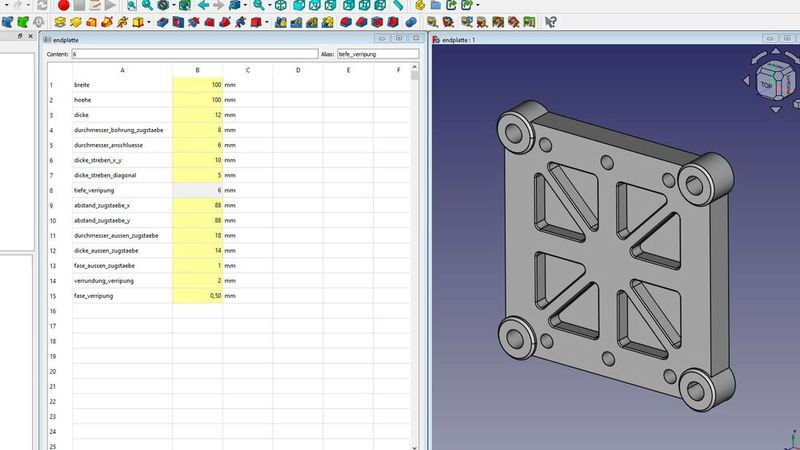
In the presented project, a 3D CAD model of the end plate of a PEM fuel cell is first constructed in the FreeCAD work area part design. This 3D CAD model is then connected with a table from the spreadsheet workspace. Then, a manufacturing drawing of the 3D CAD model of the end plate is derived in the Techdraw workspace. Subsequently, the mechanical loads of the end plate during assembly to the whole PEM fuel cell are simulated in the FEM workspace. Finally, the toolpaths for a CNC milling machine are generated with the CAM workspace.
The 3D CAD model forms the basis for the entire workflow. This is created in the Part Design workspace. A sketch and feature-based design process is used to gradually build the 3D CAD model, similar to conventional 3D CAD systems. The workflow is simplified and described in three steps below:
Choose an existing plane or create a new one.
Create a sketch of the cross section of the 3D CAD model on the selected plane.
Create a 3D feature, e.g. padding or rotation body (known as extrusion and revolution, each in additive and subtractive variant).
All features that are based on topology elements of the 3D CAD model are created at the end. These features include chamfers or fillets among others. In general, the number of features referencing topology elements should be minimized to obtain a stable 3D CAD model that can flexibly be modified in terms of dimensions.
In Freecad, calculations can be performed using integrated tables. The cells in the tables can be referenced in sketches, features, and other places in Freecad. This allows designers to also carry out the preliminary design of individual components and assemblies in Freecad.
Deriving the manufacturing drawing (CAD)
Based on the 3D CAD model of the end plate, the technical drawing for production is then automatically derived.
For this, a new, blank sheet is added to the Freecad document from the sheet templates. Then the 3D CAD model is rotated into the main view and multiple projections, with the option to select the scale and projection directions, are placed on the sheet.
Then, guidelines, dimensions with tolerances and fits, information on edges and surfaces, and other elements of technical drawings are added.
Finally, the title block is filled out with information about the material, general tolerances, document management information, and company information.
The drawing derivation in Freecad therefore follows a similar process to other CAD systems. Consequently, designers basically don't have to learn new working methods.
The technical drawing is important for manufacturing because it is the official document that can also be referenced in contracts. A 3D CAD model alone is not decisive for manufacturing because it lacks important information.
Strength simulation with control over mesh fineness (CAE)
The parametrically created 3D CAD model of the end plate is now used to simulate the mechanical stress in the assembled state as a whole PEM fuel cell. The simulation is carried out using the finite element method in the FEM work area, which allows for thermal and electromagnetic boundary conditions in addition to the usual mechanical ones.
For the FEM model, a copy of the 3D CAD model is created, which allows additional geometries to be added that are irrelevant for a manufacturing drawing and CAM operations. These additional geometries provide greater control over local mesh refinement. They also allow a more precise definition of the component clamping and external load as a single force or surface load.
Generating the tool paths for manufacturing (CAM)
For productive manufacturing of the end plate using a CNC milling machine, tool paths are generated in the Freecad CAM workspace (formerly called Path). These tool paths are then exported as G-code and can be used directly on the 3-axis CNC milling machine for the production of the end plate.
Date: 08.12.2025
Naturally, we always handle your personal data responsibly. Any personal data we receive from you is processed in accordance with applicable data protection legislation. For detailed information please see our privacy policy.
Consent to the use of data for promotional purposes
I hereby consent to Vogel Communications Group GmbH & Co. KG, Max-Planck-Str. 7-9, 97082 Würzburg including any affiliated companies according to §§ 15 et seq. AktG (hereafter: Vogel Communications Group) using my e-mail address to send editorial newsletters. A list of all affiliated companies can be found here
Newsletter content may include all products and services of any companies mentioned above, including for example specialist journals and books, events and fairs as well as event-related products and services, print and digital media offers and services such as additional (editorial) newsletters, raffles, lead campaigns, market research both online and offline, specialist webportals and e-learning offers. In case my personal telephone number has also been collected, it may be used for offers of aforementioned products, for services of the companies mentioned above, and market research purposes.
Additionally, my consent also includes the processing of my email address and telephone number for data matching for marketing purposes with select advertising partners such as LinkedIn, Google, and Meta. For this, Vogel Communications Group may transmit said data in hashed form to the advertising partners who then use said data to determine whether I am also a member of the mentioned advertising partner portals. Vogel Communications Group uses this feature for the purposes of re-targeting (up-selling, cross-selling, and customer loyalty), generating so-called look-alike audiences for acquisition of new customers, and as basis for exclusion for on-going advertising campaigns. Further information can be found in section “data matching for marketing purposes”.
In case I access protected data on Internet portals of Vogel Communications Group including any affiliated companies according to §§ 15 et seq. AktG, I need to provide further data in order to register for the access to such content. In return for this free access to editorial content, my data may be used in accordance with this consent for the purposes stated here. This does not apply to data matching for marketing purposes.
Right of revocation
I understand that I can revoke my consent at will. My revocation does not change the lawfulness of data processing that was conducted based on my consent leading up to my revocation. One option to declare my revocation is to use the contact form found at https://contact.vogel.de. In case I no longer wish to receive certain newsletters, I have subscribed to, I can also click on the unsubscribe link included at the end of a newsletter. Further information regarding my right of revocation and the implementation of it as well as the consequences of my revocation can be found in the data protection declaration, section editorial newsletter.
In the CAM workspace, a tool library is created as a digital twin. The tool library represents the tools actually used in the machine tool. The tools from the library are used to simulate the travel paths.
The end plate can be manufactured in a 3-axis CNC milling machine with only two clamping operations. For this, the Freecad CAM operations Surface, Pocket, Profiles, Drilling and Helix are used.
PEM Fuel Cell Project in Freecad
Using the Freecad software, a comprehensive model (Digital Twin) of the end plate of a PEM fuel cell was developed. PEM fuel cells are used in e-mobility alongside battery-powered vehicles. Since end plates currently still offer a lot of development potential, the weight of the end plates, and thus of the entire vehicles in which the fuel cell is used, can be reduced, making the vehicles more energy efficient. In the next step, the weight of this end plate can be optimized in Freecad by using lightweight construction methods.
The project presented here of the end plate of a PEM fuel cell shows the application of Freecad using a concrete example. Considering that the software is free to use, there are a few challenges for productive usage:
Support reliability: Freecad is maintained by a community of volunteers. Support for open-source software like Freecad is usually not always reliable and timely available. That is why Alsado has committed itself to providing long-term Freecad support in the German-speaking region, so that users can use the software reliably and efficiently.
Documentation: Freecad has an extensive online manual in the form of a wiki page. The quality of the documentation can vary greatly because it is maintained by volunteers. In some cases, the wiki can be incomplete, outdated or non-existent. Alsado helps to close gaps in the documentation and bring explanations up to date or clarify them.
Updates: Freecad is constantly being further developed to add new functions and improve usability. Alsado helps to keep users informed about changes and to keep the program version up to date.
Learning process: Freecad is a 3D CAD software with many specialized functions for niche applications. The abundance of functions can be overwhelming for some users. As a result, the learning process can involve a significant time investment and a high degree of engagement. Alsado helps to learn the necessary functions and work methods quickly and safely so that productive work can be done without detours.
Those who master these challenges can look forward to saving on license costs, independence through open file formats, respect from well-trained designers, and endless expandability of the software to optimize their own design processes.



:quality(80)/p7i.vogel.de/wcms/17/b8/17b8af0cb725e0e1d3e8d72458bab260/siemens-meet-at-the-machinev1.jpeg "“Meet at the Machine” is Siemens’ new initiative, which aims to bring together machine builders, software, and automation technologies to accelerate innovation in the machine tool industry and help manufacturers become productive more quickly. (Source: Siemens)")
:quality(80)/p7i.vogel.de/wcms/8e/7e/8e7e0cda4c68699bcc48283a38739769/0133316747v1.jpeg "A little-known hidden champion! When people think of laser cutting, the first thing that comes to mind is the power of the laser beam—and it is impressive to see the sparks flying. But Air Liquide—an exhibitor at Euroblech, by the way—wants to make it clear that the process gas is also key to success. (Image:AI-generated)")
:quality(80)/p7i.vogel.de/wcms/20/fa/20fa35e0af203c3464f7e7fdbb57a685/0133281172v1.jpeg "Since 2003, Etzinger AG has been developing and manufacturing high-quality coffee grinders, pepper mills, and grinding mechanisms for professional and home use. (Image:Etzinger)")
:quality(80)/p7i.vogel.de/wcms/69/91/6991413943488b4a2f6fde9dcd88c5b0/0133256686v1.jpeg "The CMA-patented pendulum mount can compensate for radial tolerances of up to one millimeter. (Image:Schwiening)")
:quality(80)/p7i.vogel.de/wcms/38/79/38799bfbbccd938b64c67068cfa68780/0133329362v1.jpeg "What exactly enables machines to act on their own? (Image:Shutterstock)")
:quality(80)/p7i.vogel.de/wcms/1b/9f/1b9fc9f113fc66212e2c0e17a3edaf9f/org-blobs-user-response-file-output-f317796f-57b7-483f-9403-5d9ac8a816f5-plugin-output-call-kdigtepb7be7us8xvbota0mh-1672x940v1.png "According to Barclays data, Europe leads the global trade in actuator components. With a 34 percent share, the region ranks ahead of China, which has a 26.3 percent share. (Source: Statista | CC BY-ND 4.0, AI-generated)")
:quality(80)/p7i.vogel.de/wcms/f5/4c/f54c9fc59ccb0604ab9219188469a45f/image1v1.jpeg "Christopher Savoia, Global Head of the UR+ Ecosystem at Universal Robots, presents the new SP7 Smart Panel on a UR17g-1300 robot during the unveiling of Gen 7—UR’s 7th-generation robot platform—at IMTS in Chicago on September 14, 2026. (Image:Image: Teradyne Robotics)")
:quality(80)/p7i.vogel.de/wcms/bd/4e/bd4ef09ab0f84932ea76ca0330ffe789/0133329802v1.jpeg "The robotics boom and its consequences: According to a study, a significant portion of value creation occurs in the electronics industry. (Image:Fraunhofer IPA)")
:quality(80)/p7i.vogel.de/wcms/87/87/87870cf2b30aaef7b8a06212a4ef2c14/0133403885v1.jpeg "A digital twin and a real component demonstrate how closely simulation and manufacturing are converging. Stampack Xpress 2026.1 virtually models forming behavior and supports the validation of process and tool design. (Image:Stampack)")
:quality(80)/p7i.vogel.de/wcms/59/2a/592a7f2d0964e9e6846cae331f5daa3a/0133266065v1.jpeg "Perforated metal sheets are particularly well-suited for balcony railings, as they combine stability, privacy, and design versatility. (Image:Ripo Factory)")
:quality(80)/p7i.vogel.de/wcms/45/64/45642ff0fe0a6bec251b77739131d83b/abb-ferrari-hypersail-16-9-three-quarter-front-viewv1.jpeg "The Ferrari Hypersail is a 100-foot monohull wing-in-plane yacht powered entirely by renewable energy. (Source: ABB / Ferrari Hypersail)")
:quality(80)/p7i.vogel.de/wcms/3e/0e/3e0e3ea22e48410ceada53b02ffccb59/0133358454v1.jpeg "BYD top executive Stella Li plans to offer megawatt flash charging for commercial vehicles as well. (Image:VDA/IAA Transportation 2026)")
:quality(80)/p7i.vogel.de/wcms/e2/7d/e27de60472809cc58ac0d321066c9679/l1051833v1.jpeg "Geely has acquired a stake of just over 26 percent in Renault do Brasil. Geely models for the South American market are now also being produced at the Ayrton Senna plant in São José dos Pinhais. (Image:Renault)")
:quality(80)/p7i.vogel.de/wcms/1e/c1/1ec1495eb283200f4b7cb55de0c4dff7/20260917-110436643v1.jpeg "Ceremonial launch of Mercedes-Benz GLA production in Rastatt; among those in attendance was plant manager Marco Zwick (second from the right). (Source: Thomas Günnel – Automotive Industry)")
:quality(80)/p7i.vogel.de/wcms/76/f3/76f310eed0caebc79ff91195c29de08d/visual-siwa-treatment-optimizerv1.jpeg "A Mireo train from Siemens Mobility was used in the “Automated Train” project for a fully automated delivery and return trip on the open rail network. (Source: Siemens Mobility)")
:quality(80)/p7i.vogel.de/wcms/4c/53/4c534208d09a9b1ce597938715e7fc19/0133288763v1.jpeg "Logic Folding: In its latest Kirin 9050 Pro, Huawei uses hybrid bonding to distribute the computing units across two silicon layers in order to increase the effective transistor density without resorting to finer manufacturing processes. (Image:Huawei)")
:quality(80)/p7i.vogel.de/wcms/56/d1/56d131e0b5bd05ef47411e92ad740cb4/0133351029v1.jpeg "Researchers at DTU have developed a nanolaser in a semiconductor membrane. The structure concentrates charge carriers and the light field into a small area (shaded in blue). If data is transmitted on microchips using light instead of electrical signals, transmission speeds can be increased and energy losses reduced. (Image:Yi Yu, DTU)")
:quality(80)/p7i.vogel.de/wcms/5e/55/5e55101ddc6338f755fcf3244db1367f/0133331863v1.jpeg "For data center projects, it is becoming increasingly important to also obtain the consent of the affected community. (Image:Dall-E / AI-generated)")
:quality(80)/p7i.vogel.de/wcms/8d/f9/8df95d3f58408673986b3d643e6b63ba/0133252773v1.jpeg "TXC targets high-speed optical links in AI data centers with 312.5 MHz oscillators, among other solutions. As data rates increase, requirements for jitter and frequency stability become more demanding as well. (Bild: TXC)")
:fill(fff,0)/p7i.vogel.de/companies/69/88/69882c428938e/tmts2026-ticec-banner-en-2000px.png "tmts2026-ticec-banner-en-2000px (https://www.tmts.tw/en)")
:fill(fff,0)/p7i.vogel.de/companies/69/de/69de1b7403b0d/simtos-logo.jpeg "simtos-logo (SIMTOS)")
:quality(80)/p7i.vogel.de/wcms/66/f2/66f2980fdbe62a514d57000449ec9fcf/0118883506v1.jpeg "Deriving a manufacturing drawing of the end plate in the Techdraw workspace in Freecad and exporting as a PDF document for document management.(Image: Alsado)")
:quality(80)/p7i.vogel.de/wcms/db/60/db60f0281ed0659d270859679bb84035/0118883505v1.jpeg "Generating tool paths using the Freecad-CAM workspace and exporting the tool paths as G-code for the 3-axis CNC milling machine.(Image: Alsado)")
:quality(80)/p7i.vogel.de/wcms/6d/6e/6d6e5575cba335a2d67d3cf114005d73/0126540577v1.jpeg "Open-source software offers cost efficiency, flexibility, security, and independence through transparent source code and strong community support. (Image: ©Igor Tichonow - stock.adobe.com / AI-generated)")
:quality(80)/p7i.vogel.de/wcms/25/51/2551b61097c77bc1001804d51b3b3adb/0132795572v1.jpeg "A five-axis milling machine no longer necessarily has to be located in a production hall. If it fits through a standard door and can be operated without specialized training, numerous possibilities open up. (Image:Gemini / LBR Manufacturing / AI-generated)")