


:quality(80)/p7i.vogel.de/wcms/dd/92/dd928ba2e2956aa2bfff4888af8b08f8/photo--1v1.jpeg "Catalog product for extreme operating conditions: The new NRTVG guide carriage from Bosch Rexroth withstands extreme environmental conditions. (Source: Bosch Rexroth AG)")
:quality(80)/p7i.vogel.de/wcms/5a/9e/5a9e57e26964ba5c9d8719a9ee520bb3/0133310195v1.jpeg "Germany and the United Arab Emirates have signed an agreement to stand shoulder to shoulder in times of crisis. This will bring Germany many billions, to say the least.
From left: Sheikh Mohammed bin Sajed al-Nahjan and Federal Chancellor Friedrich Merz. (Image:dpa / K. Nietfeld)")
:quality(80)/p7i.vogel.de/wcms/ce/96/ce964ee3cbd875e63a809c3df1d2b01e/0133312918v1.jpeg "Do you also have a branch in China and are looking for a local partner there with whom you can work to strengthen your market position? If so, time is running out, as a survey by the German Chamber of Foreign Trade in Beijing reveals ... (Image: AI-generated)")
:quality(80)/p7i.vogel.de/wcms/a0/94/a09489b453e958dc8ffd85accab2aaf3/0130556732v1.jpeg "Mutares supported two of its portfolio companies to help them strengthen their position. It worked out perfectly. Now both have been sold. Read here to find out exactly what this is all about... (Image:Mutares)")
:quality(80)/p7i.vogel.de/wcms/81/dc/81dc63ed24c562521413023779495e7d/chris-kramerv1.jpeg "Chris Kramar, Director and General Manager of OEM Solutions for Germany, Austria, and Switzerland at Dell Technologies (Source: Dell Technologies)")
:quality(80)/p7i.vogel.de/wcms/bb/f5/bbf5342f532debc1bd7c09c2b9a0bf42/0133176497v1.jpeg "Over the past two years, AI has emerged as the most important growth driver in the industry. (Image: ©Gorodenkoff - stock.adobe.com)")
:quality(80)/p7i.vogel.de/wcms/01/61/01615a0939754c41e9d2c8971bf0b38a/web-image-kuka-kmf-1500p-300-dpi-1v1.jpeg "Thanks to its design, the KMF 1500P-CB is suitable for the stable and flexible handling of closed and open pallets. (Source: Kuka)")
:quality(80)/p7i.vogel.de/wcms/0b/ef/0bef343dfe1c7f83a1be01e7e83cc5ac/delta-fabrikv1.jpeg "Autonomous mobile manipulation robots can perform a wide range of tasks in a modern factory, from loading machines to quality control. (Image:Delta)")
:quality(80)/p7i.vogel.de/wcms/f4/3d/f43d1f4297d9ae0cd1b6d2adfcb5ffe1/0133276470v1.jpeg "Simulation: Electric arcs in the electrical industry, including associated field simulation. (Image:CADFEM)")
:quality(80)/p7i.vogel.de/wcms/1d/fb/1dfbb415cd837102a33ce21ecf052ec3/0133277411v1.jpeg "LED drivers: LED circuit boards connect the light fixture to the electronics. During design, the operating current, forward voltage, and temperature must be taken into account across the entire operating range. (Image: ©Maria - stock.adobe.com)")
:quality(80)/p7i.vogel.de/wcms/80/8a/808a0eccf49a2a4fe560bd1998506ef9/0133308770v1.jpeg "Just like that, the supports are gone! High-speed footage of the automated, ultrasound-based process for removing optimized support structures from additively manufactured metal parts. It will be presented for the first time at Formnext from November 17 to 20. (Image:Fraunhofer IAPT)")
:quality(80)/p7i.vogel.de/wcms/be/4d/be4d7294d3d171468dc0b83efa4f442c/0133268906v1.jpeg "Here, two experts from Lufthansa Technik are applying the “AeroSHARK” coating to an aircraft. Until now, Boeing has been using this coating, which mimics the skin structure of sharks. Now Airbus also wants to use it to make its aircraft more fuel-efficient. (Image:Lufthansa Technik)")
:quality(80)/p7i.vogel.de/wcms/39/86/398641ac031ac48fd402c27ffe4f0e0d/zf-screenshot-2026-09-09-131739v1.png "The decarbonization of commercial vehicles will be a key topic at IAA Transportation next week. ZF is advocating for a more technology-neutral approach. (Image:ZF)")
:quality(80)/p7i.vogel.de/wcms/94/1e/941e22de0ec2d22e9619c469ec79292b/20260731163822591v1.jpeg "The Chinese government wants its automakers to adhere to certain rules of conduct when operating abroad. (Image:Sany Truck)")
:quality(80)/p7i.vogel.de/wcms/33/f6/33f69ba076b4f655d74bd6788cf5c4a0/0133305882v1.jpeg "As they move toward production readiness, the BMW iX5 Hydrogen prototypes are undergoing an extensive testing program. (Image:BMW)")
:quality(80)/p7i.vogel.de/wcms/bb/02/bb02989aac1291557168fb36afc42343/0133288089v1.jpeg "In China, automakers will be held liable in the future if traffic rules are violated while in autonomous driving mode and, for example, an accident occurs. (Image:Created with AI)")
:quality(80)/p7i.vogel.de/wcms/6c/a6/6ca6c6410e051401d5596d5cc6dfa277/0133283570v1.jpeg "From Core to Platform: With MIPS, ARC, and RISC-V, competition is shifting from individual processor IP blocks to integrated compute platforms for specialized applications. (Image:Dall-E / AI-generated)")
:quality(80)/p7i.vogel.de/wcms/73/17/73174a2afe684fa12d7d6a57b29b20e2/0133305506v1.jpeg "AI data centers are a key driver of direct current technologies. (Image:Pixabay / Brian Penny / AI-generated)")
:quality(80)/p7i.vogel.de/wcms/08/b2/08b2ce49b6d6d11d5953064bb0a62f37/0133308791v1.jpeg "If what Anthropics is accusing its Chinese AI competitors of is true, then the industry is in for quite a shakeup! At stake is nothing less than Chinese AI systems—such as Kimi and Deepseek—that were actually trained indirectly using U.S. AI systems. (Image: AI-generated)")
:quality(80)/p7i.vogel.de/wcms/c4/b5/c4b5badd67b0037f23c1d69806a13d16/0133216860v1.jpeg "Fascinating Technology: ASML's NXE3800E EUV machine. (Image:ASML)")
:fill(fff,0)/p7i.vogel.de/companies/68/a4/68a47beec75ce/logo-cmyk-de.jpeg "logo-cmyk-de (https://www.datatec.eu/)")
:fill(fff,0)/p7i.vogel.de/companies/69/de/69de1b7403b0d/simtos-logo.jpeg "simtos-logo (SIMTOS)")
:quality(80)/p7i.vogel.de/wcms/71/b1/71b165f89d671152b50590bea453e4bc/open-source-bild1v1v1.webp "Visualization of a Drop-Off Simulation of a Mars Rover from the Open-Source Workflow. (Source: Alsado)")
:quality(80)/p7i.vogel.de/wcms/70/ae/70aef7b25535886b448ff74400323fe9/screenshot-202026-02-26-20084018v1.png "Modeling the EV Platform from Shells and Solids Using the Part, Part Design, and Sketcher Workbenches. (Source: Alsado)")
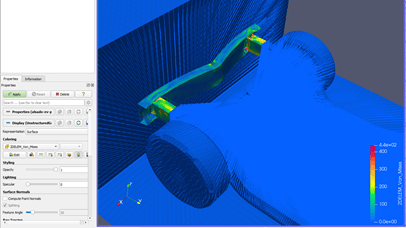
:quality(80)/p7i.vogel.de/wcms/75/37/75379707b4036012ec0d74ca056f692b/screenshot-202026-02-26-20083500v1.png "Pre-Processing of a Crash Test with the EV Platform and a Wall in Pre-Po-Max. (Source: Alsado)")
:quality(80)/p7i.vogel.de/wcms/78/98/7898053a36d1905c78c4c897dcfaea77/screenshot-202026-02-26-20083627v1.png "Overview of the Open-Source Workflow for Crash Tests and Its Interfaces. (Source: Sadowski)")
Date: 08.12.2025
Naturally, we always handle your personal data responsibly. Any personal data we receive from you is processed in accordance with applicable data protection legislation. For detailed information please see our privacy policy.
Consent to the use of data for promotional purposes
I hereby consent to Vogel Communications Group GmbH & Co. KG, Max-Planck-Str. 7-9, 97082 Würzburg including any affiliated companies according to §§ 15 et seq. AktG (hereafter: Vogel Communications Group) using my e-mail address to send editorial newsletters. A list of all affiliated companies can be found here
Newsletter content may include all products and services of any companies mentioned above, including for example specialist journals and books, events and fairs as well as event-related products and services, print and digital media offers and services such as additional (editorial) newsletters, raffles, lead campaigns, market research both online and offline, specialist webportals and e-learning offers. In case my personal telephone number has also been collected, it may be used for offers of aforementioned products, for services of the companies mentioned above, and market research purposes.
Additionally, my consent also includes the processing of my email address and telephone number for data matching for marketing purposes with select advertising partners such as LinkedIn, Google, and Meta. For this, Vogel Communications Group may transmit said data in hashed form to the advertising partners who then use said data to determine whether I am also a member of the mentioned advertising partner portals. Vogel Communications Group uses this feature for the purposes of re-targeting (up-selling, cross-selling, and customer loyalty), generating so-called look-alike audiences for acquisition of new customers, and as basis for exclusion for on-going advertising campaigns. Further information can be found in section “data matching for marketing purposes”.
In case I access protected data on Internet portals of Vogel Communications Group including any affiliated companies according to §§ 15 et seq. AktG, I need to provide further data in order to register for the access to such content. In return for this free access to editorial content, my data may be used in accordance with this consent for the purposes stated here. This does not apply to data matching for marketing purposes.
Right of revocation
I understand that I can revoke my consent at will. My revocation does not change the lawfulness of data processing that was conducted based on my consent leading up to my revocation. One option to declare my revocation is to use the contact form found at https://contact.vogel.de. In case I no longer wish to receive certain newsletters, I have subscribed to, I can also click on the unsubscribe link included at the end of a newsletter. Further information regarding my right of revocation and the implementation of it as well as the consequences of my revocation can be found in the data protection declaration, section editorial newsletter.
:quality(80)/p7i.vogel.de/wcms/6d/6e/6d6e5575cba335a2d67d3cf114005d73/0126540577v1.jpeg "Open-source software offers cost efficiency, flexibility, security, and independence through transparent source code and strong community support. (Image: ©Igor Tichonow - stock.adobe.com / AI-generated)")
:quality(80)/p7i.vogel.de/wcms/fa/e4/fae41f887d3922f4eb6693d95448499c/0126796995v1.jpeg "Autodesk University will take place this year from September 16 to 18, 2025. Participants can look forward to a diverse program focused on design and manufacturing. (Image:Autodesk)")