Here we present five optimized solutions for working with CAD. It involves automated data preparation, visualization, CAD software, and easy data exchange and conversion.
We present five improved solutions for working with CAD data.
(Image: lucadp - stock.adobe.com)
Workflow automates data preparation
Experts know the problem: the preparation of 3D data is often time-consuming and error-prone. A new workflow from the digital engineering specialist Invenio Virtual Technologies automates this process, making it significantly more efficient, it is said.
The new workflow relieves experts by automating sub-steps that require high manual effort, such as the assembly and positioning of 3D data. For the desired result, one or more product structures are initially read in. This allows parts from different structures to be automatically assembled.
With the help of a control file, these are then arranged in a new structure. A targeted selection, for example with components appearing multiple times in different positions, is also possible. The output is provided as a PLMXML file with linked JTs. According to Invenio, the results are available in a matter of seconds.
Possible use cases for the automation workflow include the 3D representation of technical processes, as found in assembly or operating instructions, as well as the visualization of individual parts up to entire assemblies.
Make decisions based on fully loaded data
JT (Jupiter Tessellation) is globally recognized as an ISO standard (ISO 14306) and has long been established as a process format. Thanks to its compact, lightweight structure and support for PMI (Product Manufacturing Information), it is becoming an indispensable standard in more and more industries. Particularly compared to native CAD formats, JT offers significant advantages. JT has become indispensable in various fields and plays a key role in mechanical engineering, especially in prototype validation, assembly planning, or DMU checks.
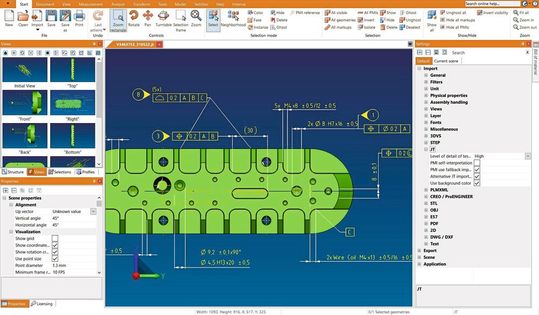
With multi-threading and optimal core performance, the importer loads even complex models with all PMI and geometry data particularly quickly.
(Image: Kisters)
The new JT importer in the 3D-View-Station addresses this precisely: with multi-threading and optimal core performance, it loads even complex models with all PMI and geometry data in record time, it is said. Particularly noteworthy are the additional functions that are set to revolutionize the handling of JT data. The automatic reorientation of the PMI ensures that they are always perfectly legible from the current camera perspective. The background colors of JT files are also almost exactly adopted, supporting realistic representation. The "Intelligent Fit" automatically adjusts the view so that even small details and PMI remain optimally visible.
CAD software: Intelligent features accelerate workflows
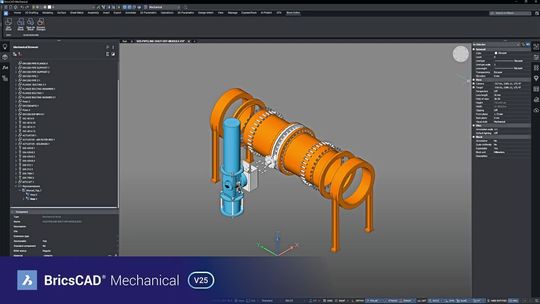
With the introduction of Brics-CAD V25, Bricsys has presented the latest version of its CAD, BIM, and mechanical software, emphasizing that over sixty intelligent features for automating and accelerating workflows have been integrated. Each of the Brics-CAD products benefits from new or improved tools that allow users to complete designs faster.
Smart meets easy—this is the motto of the new version of Brics-CAD.
(Image: Bricsys)
According to Bricsys, the key highlights of the CAD solution include:
Productivity features in a familiar user interface for CAD, BIM, Mechanical, and Civil users
Innovative 2D/3D workflows for utilizing 2D/3D data
Intelligent approaches for fast modeling capabilities and competencies
Improved drawing health tools for DWG accuracy and precise results
Extended commands and features for workflow parity with users' other CAD tools
According to further reports, Brics-CAD Mechanical V25 offers the fastest path to precise production materials in a familiar, DWG-based CAD software for design and manufacturing. New tools for quick 2D design and drafting, optimization of manufacturing workflows, and leveraging 3D models for 2D documentation include familiarity for AutoCAD users, DFX optimization tools, and 3D-to-2D tools for accurate documentation.
Link all phases of the lifecycle together
Key To Data showcases the innovations of Datakit's CAD converter Cross-Manager in version 2025.1.
(Image: Datakit)
Key To Data has introduced the new version 2025.1 of Datakit's CAD converter Cross-Manager and highlights the following features:
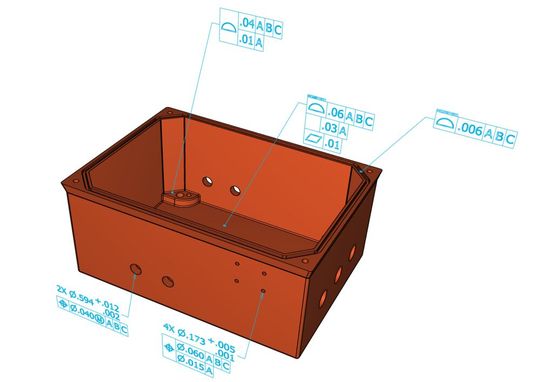
QIF Converter: A new converter for the QIF* Version 3.0 (*Quality Information Framework) file format is now included in Cross-Manager, allowing conversion from QIF to PDF, JT, and Step. The converter is intended for everyone who wants to compare quality information with development data. In addition to the QIF converter, the new version also includes 3D geometric data, tolerances, PMI dimensions, assemblies, attributes, and UUIDs (Universally Unique Identifiers).
Read UUIDs: Ability to read UUIDs defined as Navis-Works GUIDs. This ensures better traceability of the data for software users.
Date: 08.12.2025
Naturally, we always handle your personal data responsibly. Any personal data we receive from you is processed in accordance with applicable data protection legislation. For detailed information please see our privacy policy.
Consent to the use of data for promotional purposes
I hereby consent to Vogel Communications Group GmbH & Co. KG, Max-Planck-Str. 7-9, 97082 Würzburg including any affiliated companies according to §§ 15 et seq. AktG (hereafter: Vogel Communications Group) using my e-mail address to send editorial newsletters. A list of all affiliated companies can be found here
Newsletter content may include all products and services of any companies mentioned above, including for example specialist journals and books, events and fairs as well as event-related products and services, print and digital media offers and services such as additional (editorial) newsletters, raffles, lead campaigns, market research both online and offline, specialist webportals and e-learning offers. In case my personal telephone number has also been collected, it may be used for offers of aforementioned products, for services of the companies mentioned above, and market research purposes.
Additionally, my consent also includes the processing of my email address and telephone number for data matching for marketing purposes with select advertising partners such as LinkedIn, Google, and Meta. For this, Vogel Communications Group may transmit said data in hashed form to the advertising partners who then use said data to determine whether I am also a member of the mentioned advertising partner portals. Vogel Communications Group uses this feature for the purposes of re-targeting (up-selling, cross-selling, and customer loyalty), generating so-called look-alike audiences for acquisition of new customers, and as basis for exclusion for on-going advertising campaigns. Further information can be found in section “data matching for marketing purposes”.
In case I access protected data on Internet portals of Vogel Communications Group including any affiliated companies according to §§ 15 et seq. AktG, I need to provide further data in order to register for the access to such content. In return for this free access to editorial content, my data may be used in accordance with this consent for the purposes stated here. This does not apply to data matching for marketing purposes.
Right of revocation
I understand that I can revoke my consent at will. My revocation does not change the lawfulness of data processing that was conducted based on my consent leading up to my revocation. One option to declare my revocation is to use the contact form found at https://contact.vogel.de. In case I no longer wish to receive certain newsletters, I have subscribed to, I can also click on the unsubscribe link included at the end of a newsletter. Further information regarding my right of revocation and the implementation of it as well as the consequences of my revocation can be found in the data protection declaration, section editorial newsletter.
Processing of graphical or semantic PMIs: Processing of graphical or semantic PMIs to complement or improve the accuracy of converters that read the formats Creo View, Catia V5, V6, UG NX, and write JT.
Optimized handling of Nurbs: Version 2025.1 offers optimized handling of Nurbs (Non-Uniform Rational B-Splines) and tree structures in Catia V5 and V6.
Extended Solidworks assembly import: Extended Solidworks assembly import for configuration management, applicable to both virtual and imported components alike.
Autodesk Revit: The new version of Cross-Manager also enables detailed unit and color marking in Revit.
The converters integrated into Cross-Manager are constantly being developed to ensure compatibility with the latest CAD versions. As of January 2025, these are:
Digikey, a global distributor for technology components and automation products, has announced its partnership with Traceparts, a leading provider of CAD content for engineering, industry, and mechanical engineering.
The collaboration combines Digikey's selection of electronic components with Traceparts' robust 3D CAD models and design resources. Engineers, makers, and product developers will enjoy an enhanced experience that enables faster product design cycles and more efficient workflows for an optimal overall approach to the design and prototyping process, it is said.
We are pleased to integrate TraceParts' extensive 3D model library into our product catalog. This makes it easier than ever for designers and engineers to seamlessly move from idea to CAD tool to finished product.



:quality(80)/p7i.vogel.de/wcms/8e/63/8e631ccb75fda465c197fc52848289fa/0130260202v1.jpeg "According to the Laser-Zentrum Hannover, what is sizzling away underwater marks the first steps towards a way of repairing steel structures more cheaply and without complications using robots, laser 3D printing and AI ... (Image:LZH)")
:quality(80)/p7i.vogel.de/wcms/67/30/6730b015b3dd6f925877edd795eda319/0130247463v1.jpeg "The comparison between the SLA printable plastics Accura Xtreme Grey (above) and the robust newcomer Accura Xtreme Black now used at Speedpart, which represents an inexpensive and deep black alternative to mechanically processed plastic prototypes ... (Image:Speedpart)")
:quality(80)/p7i.vogel.de/wcms/06/9d/069d939b77a4feab0a8d2ece62c28dc1/0129655701v1.jpeg "This turned part is slotted twice. The deburring that would otherwise be necessary is no longer required for high-pressure machining. (Image:Knoll)")
:quality(80)/p7i.vogel.de/wcms/3f/72/3f72e30d61f3522bff192171b60776a4/0130245214v1.jpeg "No idea what else your humanoid robot can do, or where it fails? Then it might be worth taking a look at the Humanoid Capabilities Navigator, which now helps you to find the right robot for a job, or to improve humanoids in a targeted manner ... (Image:Fraunhofer IPA)")
:quality(80)/p7i.vogel.de/wcms/ba/28/ba28ec056a82abd76758c8c87296c0d5/0130213997v1.jpeg "The Nexy automatic material call-off system (AMS) controls the replenishment of non-stocked materials or components. (Image:Steute Technologies GmbH & Co. KG, Löhne)")
:quality(80)/p7i.vogel.de/wcms/21/3b/213b5e5454b0c4344ba0eaa700857607/0129635774v1.jpeg "The QRV flow control valves from Lee are available in sizes from 5.5 to 18 mm and cover a flow rate of 0.2 to 20 l/min. Depending on the version, the pressure range is either between 0.1 and 2.75 bar (1.5 - 40 psi) or between 0.17 and 2 bar (2.5 - 30 psi). (Image:Lee)")
:quality(80)/p7i.vogel.de/wcms/63/e9/63e9db3259a656cca88c5f7158af3fcb/0129385769v1.jpeg "The Agibot A2 at a Fortune China event in December 2025. (Image:Agibot)")
:quality(80)/p7i.vogel.de/wcms/df/a1/dfa1786a3b05f5ff2e51d0f633695c57/0130137877v1.jpeg "Openclaw inspires AI communities. (Image:Openclaw.ai)")
:quality(80)/p7i.vogel.de/wcms/e4/51/e451d52ce0182fb0aaa46a5774f832ef/26-04-pi-fraunhofer-iws-21160-bioslide-pic-01-4128x2321v1v1.jpeg "With the BioSlide research project, the Fraunhofer IWS is investigating how sliding systems can be designed to be more sustainable and energy-efficient. New materials can be tested in a particularly application-oriented manner on this plain bearing test stand. (Image:Fraunhofer IWS)")
![Thanks to advanced 3D printing technology, a more efficient use of resources should contribute to lower-emission aviation—this is the goal of ['skai]-lab. (Image:Oleksandr Pashchenko - stock.adobe.com / AI-generated)](https://cdn1.vogel.de/nghHNSbySccfOjG3n1qCA-FVOjQ=/288x162/smart/filters:format(jpg):quality(80)/p7i.vogel.de/wcms/62/64/626424c97a16e69f871bf216c9629c2a/adobestock-1927043193--c2-a9-20oleksandr-20pashchenko-20-e2-80-93-20stock-adobe-com-ki-generiertv1v1.jpeg "Thanks to advanced 3D printing technology, a more efficient use of resources should contribute to lower-emission aviation—this is the goal of ['skai]-lab. (Image:Oleksandr Pashchenko - stock.adobe.com / AI-generated)")
:quality(80)/p7i.vogel.de/wcms/78/28/7828775af76773458b4d1409ceb1cf0c/368945-20dam-20imagery-digital-transformation-pc-1920x1079v1v1.jpeg "Complex development projects with high regulatory requirements, such as in the aerospace industry, benefit in particular from the Intelligent Product Lifecycle. (Image:PTC)")
:quality(80)/p7i.vogel.de/wcms/e7/82/e7822e208621ba2ae892d609e60481e8/texas-20uni-850x478v1v1.jpeg "Superfoam is a composite that is capable of absorbing 10 times more energy than a conventional foam. (Image:Abbey Toronjo/Texas A&M University Division of Marketing & Communications)")
:quality(80)/p7i.vogel.de/wcms/e6/53/e6539c6b5df2d2af2970ca981131fb42/0130215307v1.jpeg "Volkswagen is in first place in the first two months of 2026—no one has sold as many cars in China as the car manufacturer. (Image:Volkswagen)")
:quality(80)/p7i.vogel.de/wcms/b0/6d/b06d9ad54bfc39053e1db5494df5cb9a/0130237932v1.jpeg "Pleased about their partnership in the field of bidirectional charging: Christian Haferkamp and Aurélie Alemany from enercity as well as Stefan Mecha and Lars Krause, both Volkswagen Commercial Vehicles (from left to right). (Image:PSONNACK)")
:quality(80)/p7i.vogel.de/wcms/2b/0b/2b0b5ff55299be32174cb0ed76718253/0130177406v1.jpeg "Rolls-Royce has received funding of 70 million US dollars from the EU public-private partnership \"Joint Undertakings for Clean Aviation\". (Image:Rolls-Royce)")
:quality(80)/p7i.vogel.de/wcms/95/7e/957ed49b185794b3e76b9e610a8a389f/0130217926v1.jpeg "Bosch wants to offer components for e-vehicles in India together with Tata. (Image:Bosch)")
:quality(80)/p7i.vogel.de/wcms/22/08/22085b4997a696887dd5a712a30b262b/0130211045v1.jpeg "Imec has announced that the world's most advanced high numerical aperture (High NA) EUV lithography system, the ASML EXE:5200, has arrived at its 300mm cleanroom in Leuven. (Image:Imec)")
:quality(80)/p7i.vogel.de/wcms/48/f2/48f250e2385d3f43743dc44133cc4731/0130161592v1.jpeg "The world's first fully functional quantum battery as a proof-of-concept, developed by CSIRO and its cooperation partners, the University of Melbourne and RMIT. (Image:CSIRO and collaborators, The University of Melbourne and RMIT)")
:quality(80)/p7i.vogel.de/wcms/16/9c/169c092e854d8740928a080cead3b88e/0130241261v1.jpeg "NVIDIA's GB300 AI chip with HBM3E and HBM4 from SK Hynix. (Image:SK Hynix)")
:quality(80)/p7i.vogel.de/wcms/3a/50/3a50d3f269f38f14d7a25a93c6f2b2f8/0130147601v1.jpeg "The compact modulator enables fast and energy-efficient data transmission and can be manufactured cost-effectively. (Image:Hugo Larocque, EPFL)")
:fill(fff,0)/p7i.vogel.de/companies/69/88/69882c428938e/tmts2026-ticec-banner-en-2000px.png "tmts2026-ticec-banner-en-2000px (https://www.tmts.tw/en)")
:fill(fff,0)/p7i.vogel.de/companies/67/eb/67eba621ef6ea/logo2.png "logo2 (Wuxi InfiMotion)")

:quality(80)/p7i.vogel.de/wcms/4c/21/4c21ad6e334d3c15981608c75ec6a628/0125867170v1.jpeg "We showcase solutions and tips that ensure greater efficiency in design. (Image:Kisters)")
:quality(80)/p7i.vogel.de/wcms/ab/82/ab82dfd86fd624854af173066cfacea5/0129154593v1.jpeg "The digital Mycelium Lifecycle Platform supports production managers in operating their machines safely, securely, efficiently, and in compliance with standards throughout their entire lifecycle. It combines the management of personnel and machines on a single platform. (Image:Pilz GmbH & Co. KG)")