Demanding measurements require measuring instruments with high configurability, flexibility, and connectivity. The Linux mode of the Analog Discovery Pro ADP3450 mixed-signal oscilloscope offers all these capabilities.
The Analog Discovery Pro ADP 3450 from Digilent offers enough flexibility for even the most demanding tasks.
(Image: Digilent)
In the following scenario: Just a few more measurements and you can hand over your current project to your sales team for presentation to potential customers. But the measurements are complicated to configure, and you have noticed some irregularities in the last few days. To get everything under control, you need a reliable measuring device that can be controlled via script to conduct complex and repetitive tests automatically. Perhaps you'd also like to integrate your device into a larger system to quickly respond to external events and save data live in the cloud or on a hard drive.
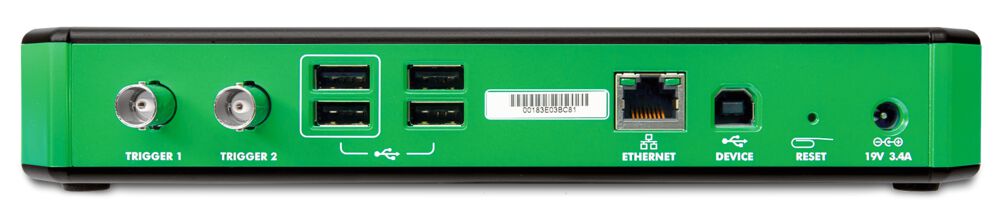
Image 2: Four high-speed USB 2.0 ports, a device-mode USB connection, and an Ethernet connection provide connectivity.
(Image:Digilent)
What might such an oscilloscope look like? And does something like this even exist? The answer to the last question is "Yes," and the device is the Analog Discovery Pro ADP3450 by Digilent. It is a true mixed-signal oscilloscope with a sampling rate of up to 0.5 GSamples/s and features four analog single-ended channels with a resolution of 14 bits each. Thus, the device offers the same performance as conventional laboratory testing equipment. In addition, the multifunctional device includes a two-channel arbitrary waveform generator, two external trigger inputs, and 16 digital inputs and outputs. Connection to a host computer is made via USB interface or RJ-45 Ethernet. A version with only two analog inputs, the ADP3250, is also available.
A software supports multiple instruments
The device can be controlled using Digilent's free WaveForms software. The application is compatible with Windows, macOS, and Linux operating systems and offers the look and feel of traditional laboratory equipment. WaveForms provides 13 software instruments:
an oscilloscope,
a signal and pattern generator,
a data logger,
static I/Os,
a voltmeter,
power supplies,
a curve tracer, and
various analyzers.
With the software instruments, a variety of signals, even from different fields, can be captured, recorded, analyzed, documented, and generated. To conduct even more demanding tests, the WaveForms application features a mathematical channel and a script editor, with which the instruments can be programmed in JavaScript.
More possibilities with a Software Development Kit
If the script editor does not offer enough customization options for the necessary context, or a higher level of automation is needed beyond the capabilities of the editor, a Software Development Kit (SDK) is also available. A dynamic library is provided for the programming interfaces (APIs) of this SDK, with which code can be written in Python, C/C++, C#, or Visual Basic. By writing one's own program, custom functions can be developed that are specifically tailored to the desired needs.
But what if further customizations or additional connectivity options are required? In this case, the Analog Discovery Pro ADP3450, with its Linux mode, offers additional flexibility and configuration options, as tests and measurements can be conducted directly on the device. Upon startup, the ADP3450 boots into a pre-installed terminal-based Debian Linux distribution and the entire setup behaves like an embedded system. In this mode, users benefit from enhanced network capability, either through Ethernet or, if necessary, by adding a suitable Wi-Fi dongle.
High connectivity for every need
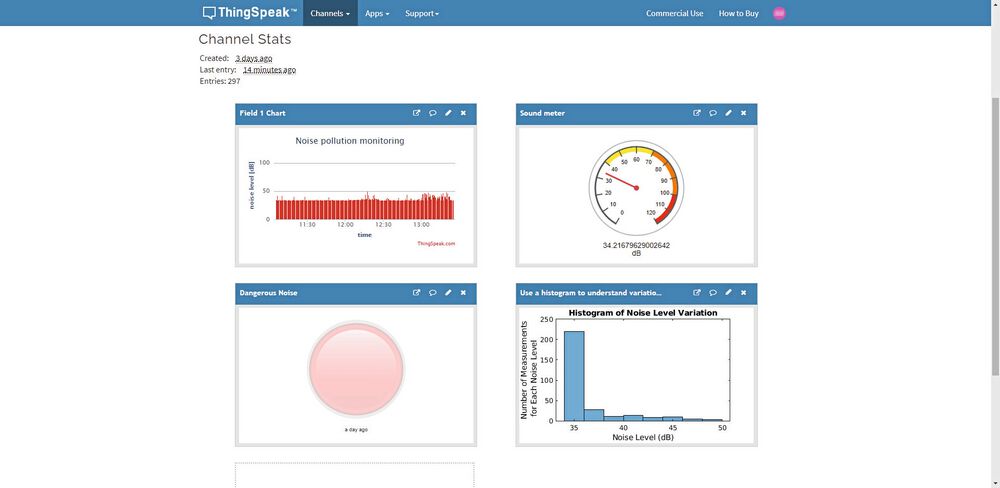
Image 2: Cloud services such as ThingSpeak allow for the visualization of data streams.
(Image:Digilent)
In Linux mode, the four high-speed USB 2.0 ports are active. Peripheral devices such as FAT/FAT32-formatted flash drives can be connected to these ports, on which the captured data can be locally saved, for example, in CSV format. Alternatively, the measurements can be streamed to a cloud-based service like ThingSpeak from MathWorks for storage, display, and analysis. Or to any other third-party logging environment. All these features render an additional host device, such as a Raspberry Pi or a PC, unnecessary.
And if you need to communicate with the ADP3450, you can always connect via a serial terminal program such as PuTTY or Tera Term. Internet connectivity for remote access and the Internet of Things (IoT) is also available. Moreover, it is possible to update the Linux operating system installed on the device via the WaveForms software and a connected USB drive. New versions are provided by Digilent itself. For testing, the programming languages available are Python, C/C++, C#, or Visual Basic. With these routines, the full functionality of the WaveForms SDK is available, and they can also be part of a larger measurement environment. Since no host is involved, the test results are available very quickly. The complexity of automated scripts can far exceed the possibilities available in standard mode along with the WaveForms application. Additionally, it is possible to integrate the ADP3450 into other applications and easily access it from there.
Mobile power supply and measurements on the go
It is also possible to read parameters or measurements from another device via Ethernet, Wi-Fi, or cloud services. This way, a measurement can be initiated as soon as another testing device reports that a predefined threshold has been exceeded. Or tests can be scheduled to run only at a specific time of day. This is helpful for finding that one, truly annoying error that only occurs at the twelfth stroke after midnight.
Date: 08.12.2025
Naturally, we always handle your personal data responsibly. Any personal data we receive from you is processed in accordance with applicable data protection legislation. For detailed information please see our privacy policy.
Consent to the use of data for promotional purposes
I hereby consent to Vogel Communications Group GmbH & Co. KG, Max-Planck-Str. 7-9, 97082 Würzburg including any affiliated companies according to §§ 15 et seq. AktG (hereafter: Vogel Communications Group) using my e-mail address to send editorial newsletters. A list of all affiliated companies can be found here
Newsletter content may include all products and services of any companies mentioned above, including for example specialist journals and books, events and fairs as well as event-related products and services, print and digital media offers and services such as additional (editorial) newsletters, raffles, lead campaigns, market research both online and offline, specialist webportals and e-learning offers. In case my personal telephone number has also been collected, it may be used for offers of aforementioned products, for services of the companies mentioned above, and market research purposes.
Additionally, my consent also includes the processing of my email address and telephone number for data matching for marketing purposes with select advertising partners such as LinkedIn, Google, and Meta. For this, Vogel Communications Group may transmit said data in hashed form to the advertising partners who then use said data to determine whether I am also a member of the mentioned advertising partner portals. Vogel Communications Group uses this feature for the purposes of re-targeting (up-selling, cross-selling, and customer loyalty), generating so-called look-alike audiences for acquisition of new customers, and as basis for exclusion for on-going advertising campaigns. Further information can be found in section “data matching for marketing purposes”.
In case I access protected data on Internet portals of Vogel Communications Group including any affiliated companies according to §§ 15 et seq. AktG, I need to provide further data in order to register for the access to such content. In return for this free access to editorial content, my data may be used in accordance with this consent for the purposes stated here. This does not apply to data matching for marketing purposes.
Right of revocation
I understand that I can revoke my consent at will. My revocation does not change the lawfulness of data processing that was conducted based on my consent leading up to my revocation. One option to declare my revocation is to use the contact form found at https://contact.vogel.de. In case I no longer wish to receive certain newsletters, I have subscribed to, I can also click on the unsubscribe link included at the end of a newsletter. Further information regarding my right of revocation and the implementation of it as well as the consequences of my revocation can be found in the data protection declaration, section editorial newsletter.
With a Wi-Fi dongle and a mobile power supply (the ADP3450 requires 19 V), measurements can be taken on the go. Alternatively, the device can be accessed remotely. For this, the device needs to be within a company network. With the appropriate configuration, it can also be connected via a virtual private network (VPN). In short, the Linux mode of the ADP3450 simplifies the implementation of complex or repetitive testing and measuring tasks, regardless of the development phase of a project.
Starting in Linux mode is simple
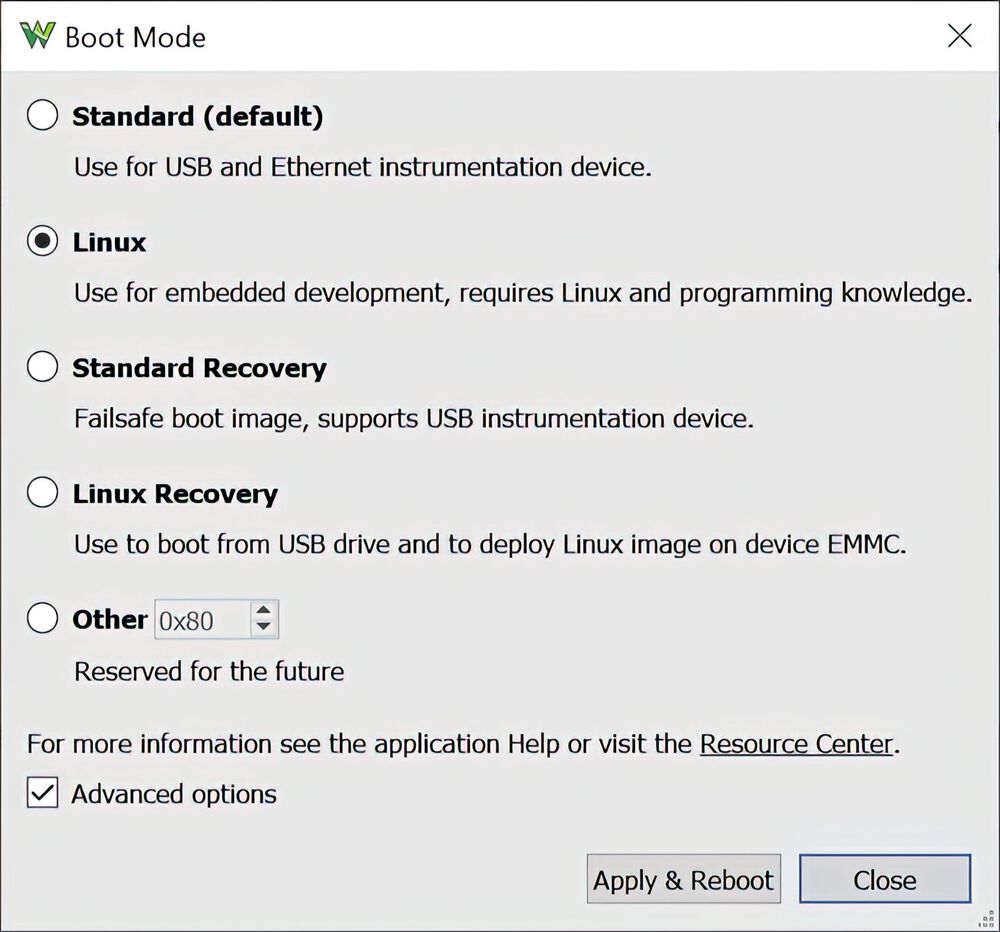
Image 3: Switching to Linux mode is done through the WaveForms application.
(Image:Digilent)
You might wonder: And how do I start the ADP3450 in Linux mode? It's pretty straightforward. The first step is to connect to the device using a serial terminal program. It's recommended to do this before booting into Linux mode. This avoids missing important boot messages, such as the login prompt. To ensure the connection works as expected, set the virtual serial port in the program to 115200 baud, 8 bits, 1 stop bit, and no parity. The physical connection between the device and the host PC is made using a standard USB cable that connects to the USB Device Mode socket on the back of the ADP3450.
Once the connection is established, launch the WaveForms application, open the Device Manager, and select the "Linux" option. Then click on "Apply & Reboot." Next, monitor the boot messages on the serial terminal. After the boot process is complete, the login screen appears. Use the username and password specified in the ADP3450 reference manual. Since these are the same for all Analog Discovery Pro devices, it makes sense to replace them with your own. This is especially important if the device will be connected to the internet. This prevents others from being able to access the oscilloscope.
Once logged in, you can get started. The next step is to connect Analog Discovery Pro to the internet, either through the Ethernet port or a Wi-Fi dongle. Digilent lists compatible devices on its reference pages, where you can also find instructions on how to establish the connection. Perhaps you would like to install Python and start writing scripts, or log into a cloud logging environment to stream data. For these purposes too, the Digilent website provides explanations that help with specific testing and measuring tasks.



:quality(80)/p7i.vogel.de/wcms/dd/08/dd086510d9ae7b50181f6070e4463b44/0129363730v1.jpeg "Typical application for ionizing devices: Wrapping films. (Picture: ©Adobe Stock/SMC)")
:quality(80)/p7i.vogel.de/wcms/35/57/3557c819943c53acec41a0ccba87da4f/0130049064v1.jpeg "Researchers at the Fraunhofer IWU in Chemnitz have long known that many typical sheet metal parts can be manufactured more cost-effectively using hollow embossing rollers. Now there is news to report ... (Image:Fraunhofer IWU)")
:quality(80)/p7i.vogel.de/wcms/59/02/590246e3b3f415c65edbee377c14ca77/26-06-pi-fraunhofer-iws-41450-direktplattieren-pic-01-7771x4369v1v1.jpeg "The Fraunhofer IWS has developed the new \"direct laser cladding\" process, which creates a functional layer directly on the base body by applying a strip-shaped metal to rotationally symmetrical components in a spiral and bonding it locally by laser. (Image:Christoph Wilsnack/Fraunhofer IWS)")
:quality(80)/p7i.vogel.de/wcms/73/60/73608418789b1d9c393f5e2fa974eda2/0130209906v1.jpeg "The robots of the X6 generation from b+m enable very high painting quality and are also particularly compact and easy to maintain. (Image:Beckhoff)")
:quality(80)/p7i.vogel.de/wcms/78/e9/78e9188c25a8a94e67c34c9bf8ffe495/visual-agile-20robots-20and-20google-20deepmind-20partner-20to-20bring-20intelligence-20to-20robotics-2500x1406v1v1.jpeg "Together, the partners are developing adaptable, intelligent robots for a wide range of applications (Image:Agile Robots SE)")
:quality(80)/p7i.vogel.de/wcms/e7/66/e7669ecf0260ae8fc54c214e34e4902a/0130316817v1.jpeg "Siemens and Palo Alto Networks offer tested cybersecurity solution for industrial 5G. (Image:Siemens)")
:quality(80)/p7i.vogel.de/wcms/9f/55/9f55324832c4f426958031375124d9de/siemens-20ubtech-20hmnd-1920x1079v1v1.png "Ready for the factory floor: While Ubtech is planning mass production, Siemens is already testing humanoids in real factory applications in Erlangen. (Image:Siemens)")
:quality(80)/p7i.vogel.de/wcms/11/36/113695ed260e29c8c2d9d39dc5f9d869/0130213768v1.jpeg "AI can work cheaply in China and deliver the results rapidly all over the world. (Image:Dall-E / AI-generated)")
:quality(80)/p7i.vogel.de/wcms/62/5f/625f41e87ebfef156a98c8e6393e32fd/0130211654v1.jpeg "Axial flux motors have some advantages over radial flux motor—but their production is currently still expensive. (Image:RWTH Aachen University)")
:quality(80)/p7i.vogel.de/wcms/77/9b/779b0685d010dfe45c9c2cb1cfecd467/0128886425v1.jpeg "The BlueEye is the first \"real\" hyperspectral camera for the UV range and covers the wavelength range from 220 to 380nm. (Image:Inno-spec GmbH)")
:quality(80)/p7i.vogel.de/wcms/e4/51/e451d52ce0182fb0aaa46a5774f832ef/26-04-pi-fraunhofer-iws-21160-bioslide-pic-01-4128x2321v1v1.jpeg "With the BioSlide research project, the Fraunhofer IWS is investigating how sliding systems can be designed to be more sustainable and energy-efficient. New materials can be tested in a particularly application-oriented manner on this plain bearing test stand. (Image:Fraunhofer IWS)")
![Thanks to advanced 3D printing technology, a more efficient use of resources should contribute to lower-emission aviation—this is the goal of ['skai]-lab. (Image:Oleksandr Pashchenko - stock.adobe.com / AI-generated)](https://cdn1.vogel.de/nghHNSbySccfOjG3n1qCA-FVOjQ=/288x162/smart/filters:format(jpg):quality(80)/p7i.vogel.de/wcms/62/64/626424c97a16e69f871bf216c9629c2a/adobestock-1927043193--c2-a9-20oleksandr-20pashchenko-20-e2-80-93-20stock-adobe-com-ki-generiertv1v1.jpeg "Thanks to advanced 3D printing technology, a more efficient use of resources should contribute to lower-emission aviation—this is the goal of ['skai]-lab. (Image:Oleksandr Pashchenko - stock.adobe.com / AI-generated)")
:quality(80)/p7i.vogel.de/wcms/c3/c4/c3c4ce270b083eeac55654148611f064/0130237945v1.jpeg "China is not giving up on hydrogen, but is intensifying its efforts. (Image:freely licensed from Pixabay)")
:quality(80)/p7i.vogel.de/wcms/4e/c0/4ec0bd19390b169edfa23677373dcdf1/0130260089v1.jpeg "Renewable fuels can supply European road traffic, according to a study. (Image:Aral)")
:quality(80)/p7i.vogel.de/wcms/6f/c9/6fc9050301d745cad25585c6780f8f51/0130197341v1.jpeg "Production facilities are a worthwhile target and are therefore at risk. (Image:ABB Robotics)")
:quality(80)/p7i.vogel.de/wcms/b6/62/b662adc2cec8227d8172509bbfb6ee42/25c0207-107-4961x2789v1v1.jpeg "The GLB is the second model based on Mercedes' new MMA platform. Apparently, Geely's platform is better and cheaper, which is why the two companies are negotiating a partnership. (Image:Mercedes-Benz)")
:quality(80)/p7i.vogel.de/wcms/4d/dd/4dddf438e91f394c04a095dbfd109d1c/0130236430v1.jpeg "Measurement modules: The 720301 module in combination with the SL2000 enables RMS and power calculations, among other things. (Image:Yokogawa)")
:quality(80)/p7i.vogel.de/wcms/61/fc/61fcf95f5cca15494ad18343901ae585/0130317237v1.jpeg "With the AGI CPU, Arm says it is taking a \"historic step\": With the processor aimed at AI in data centers, the company is presenting itself for the first time as a provider of its own chips, not just as a pure IP licensor. (Image:Arm)")
:quality(80)/p7i.vogel.de/wcms/82/90/8290dfe3595b6c6b33726ae8b76172c7/0130319587v1.jpeg "The concept image illustrates how the pattern of tiny protrusions and depressions created on the substrate (MgO, bottom) controls the arrangement of atoms in the superconducting material (YBCO, top). At the interface between the two layers, an electronic structure enables superconductivity to occur at higher temperatures than previously possible. (Image:Chalmers University of Technology / Riccardo Arpaia)")
:fill(fff,0)/p7i.vogel.de/companies/68/a4/68a47beec75ce/logo-cmyk-de.jpeg "logo-cmyk-de (https://www.datatec.eu/)")
:fill(fff,0)/p7i.vogel.de/companies/67/eb/67eba621ef6ea/logo2.png "logo2 (Wuxi InfiMotion)")

:quality(80)/p7i.vogel.de/wcms/70/5e/705ee511d036d58a280fcd7b79aba0aa/0128164294v1.jpeg "PXI oscilloscopes PXIe-5108 are modular, software-defined measurement devices for use in everything from basic research to mass production. They are available with four and eight inputs. (Image:National Instruments)")
:quality(80)/p7i.vogel.de/wcms/81/b7/81b73f2c8b898627e2f8fc18fea47b2b/0127093609v1.jpeg "Figure 1: An example of setting up an A²B network and the connected blocks. (Image:ADI)")